This article deals with Forex trading signals. Can you trust these forex signals? How to correctly use trading signals and where can we find them? I will also explain a real example of making a forex trade based on trading signals. The Forex trader signals are provided for each LiteFinance client in the trader profile.
The article covers the following subjects:
What are Forex trading signals?
A trading signal in forex trading is basically a clue to a trader that the price may go in a particular direction at a certain moment. Trading signals can be fundamental and technical. Fundamental signals are trading ideas or recommendations provided by another trader or an analyst, they are based on fundamental analysis. This is generally insider information. Someone learns secret information and shares it with you, and you enter a trade based on this information. A technical forex signal is a signal delivered by a technical indicator (an Expert Advisor, an oscillator and so on).
Ordinary traders hardly ever have any access to fundamental signals, as this information is available to a small group of people. It is far easier to learn technical signals based on technical analysis. They are free forex signals in special sections on trading platforms. Of course, you can receive a signal directly from a professional trader, but these signals are usually paid for.
There are special websites designed to sell trading signals provided by traders. The most popular platform has recently been Zulu, but now traders less and less tend to buy trading signals. Free trading signals provided by private analytical agencies or forex brokers are now getting more popular.
What are trading signals used for?
The relevance of trading signals has always been very high. Everybody wants to know in advance where the price will go and what trade should they enter. To solve this task, there were created special mathematical indicators, oscillators. Although there quite many types of oscillators, it is rather difficult for a trader to interpret what signal is delivered by the oscillator and how reliable this signal is.
To help a trader and save the time, modern trading signals were designed to combine the indications of major oscillators, which, in addition to the signal itself, indicate the trade direction, potential price movement, signal’s relevance; they also relate to the time frame. So, this tool provides much more trading opportunities.
Therefore, a modern trader can learn where the price will go shortly without attaching to the chart dozens of oscillators and trying to filter the signals. All this is performed by software. A trader just gets the final result and needs only to decide on whether to follow the recommendation or not.
Much good work is going on to make the trading signal services simpler and more convenient. One of the leading companies in this area is LiteFinance.
How to use trading signals?
Let us see how you can use trading forex signals that are conveniently integrated into the trader’s profile.
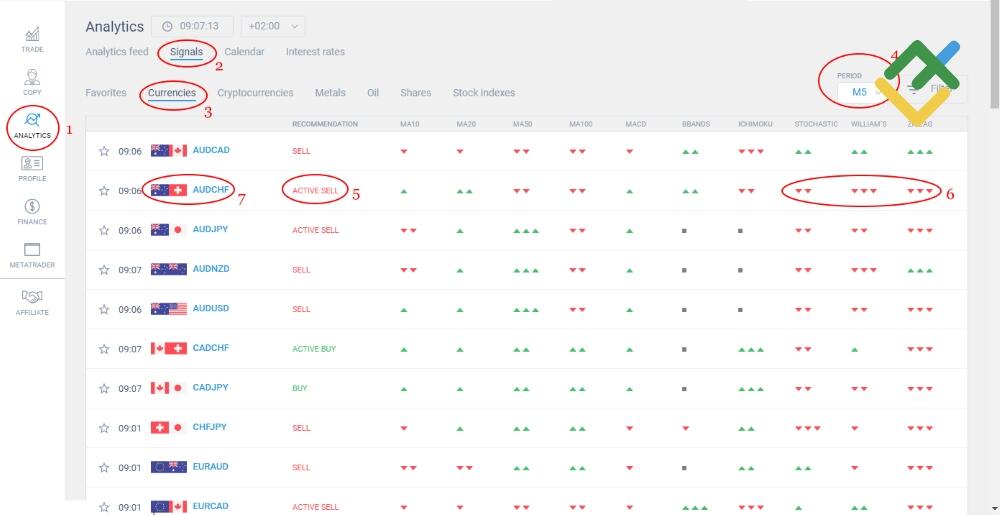
1.There is the ANALYTICS tab in the left vertical panel of the main menu in the trading account profile. When you click on the Analytics tab, you are directed to the analytical portal, where you can find not only trading signals, but also analytical materials, analysts’ opinions and interesting articles with individual forecasts of the company’s analysts.
2. Click on the Signals tab at the top of the page, it will direct you to the section with trading signals;
3. By default, there opens the Favorites tab that you can adjust to your own needs. We are now interested in the general menu of trading signals, so we choose the Currencies tab. Now, we see only real time trading signals for currency pairs.
4. First, of we all, we shall define the time frame where we want to see trading signals and where we want to enter trades, it depends on the trading strategy; let it be a short term trade.
5. In addition to the name of currency pairs, there are some other information sections, the most interesting is the Recommendation section. It can be of four types (buy, active buy, sell, active sell). Of course, active sell is a more reliable signal than just sell. So, it is better to refer to the strongest signals. If you have no experience in working with indicators, this section will be enough for you. If you don’t have enough experience to perform price chart analysis on your own and are in a constant search for trading signals, I would recommend you to join a Social Trading platform. These networks allow you to copy the trades of the experienced successful traders onto your account. Simply put, you can instantly and automatically copy their trading behavior on your account, without analyzing the forex markets, searching for signals or calculating a take profit or a stop loss level. . Besides, you choose the copy trader after analyzing his/her trading performance in the past, the profits made over the past periods and the risk level. The list of traders you can copy is here. Those who want to identify the reliability of a signal by themselves should continue reading.
6. Next, you can see the signals sent by 10 most relevant indicators for the trading instrument we trade. The first four indicators are MAs (moving averages). As this is a simple trend following indicator, you shouldn’t trust its signals at all, you can skip them right away. Next, there are more accurate oscillators that you can refer to. The last three ones, (stochastic, Bill William’s oscillator and zigzag) are in the list of top 5 best technical indicators. The strength of the signals is presented as triangles, there can be from one to three triangles. Three triangles mean the signal is very strong. As a result, we see in real time the sell signal is strong and we can enter a trade based on it.
7. We select the AUDCHF currency pair that has delivered the signal and click on its ticker;
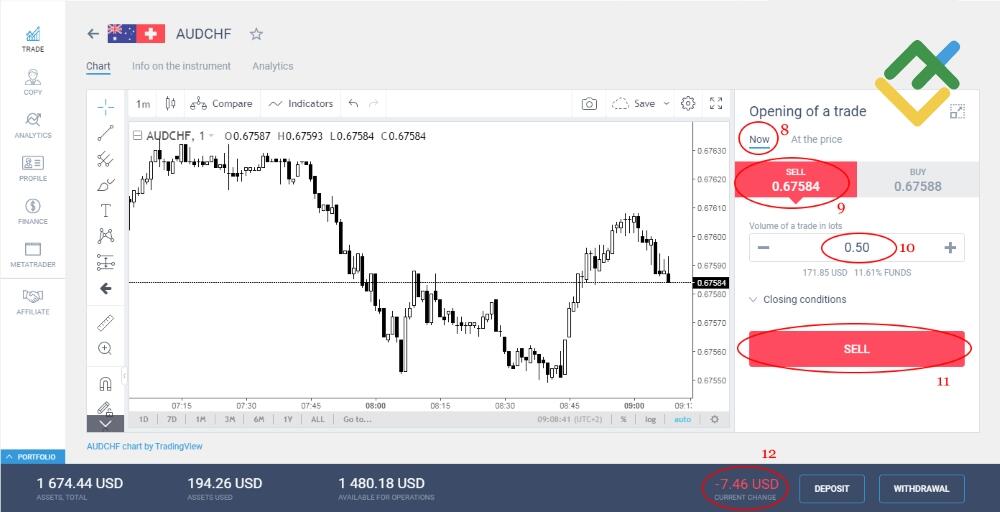
8. There will open the Trade section for this pair, where you need to enter a trade. By the time of execution, select the Now type;
9. Next, click on the Sell type at the top of the menu, as there is a sell signal;
10. Chose the volume of the trade. The more you are sure in the signal, the more you can invest in the trade. The signal is Active sell, so we can spend 0.50 lots.
11. Click on the Sell button;
12. We have entered the trade, and there is an intermediate result in the Current Change section. It is negative at the start because of the commission fee.
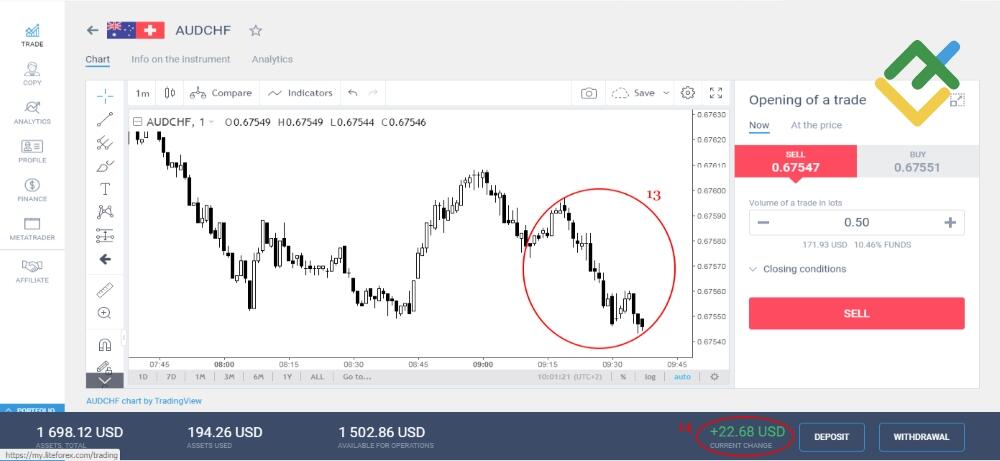
13. Sometime later, in about 25 minutes, you see the price moving down, and the trade is yielding a profit, so the signal was excellent.
14. There is already a profit of more than 20 dollars in the current change section.
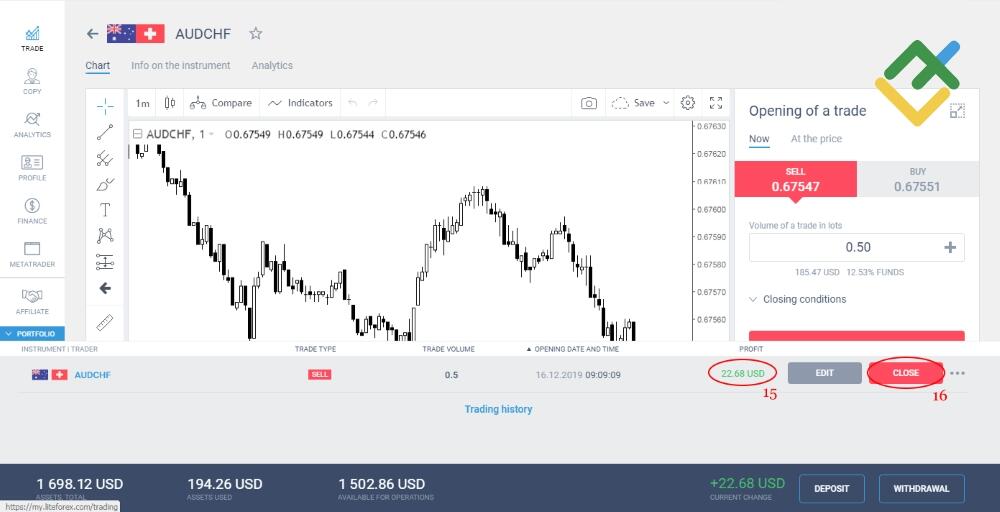
15. If the profit of 22.68 USD is enough, and, taking into account that we spent no effort to generate it, it is well enough...
16. We can exit the trade and take the profit made.
17. Here we are! It is now easy to make money using trading signals, and it is profitable, which the most important.
If you look at the Trading Signals section, you will see there are trading signals provided for all the trading instruments enlisted with the broker. So, you can enter trades for multiple trading instruments, and this will multiply your profit. Of course, some of the signals may not work, but it won’t matter in the total mass as there will be much more profitable signals than losing ones.
So, there have been enough words, it is time to do now! I hope that my article will help you earn more money. So, try and you will certainly succeed. If you have any questions, you can always ask me or LiteFinance staff members.
P.S. Did you like my article? Share it in social networks: it will be the best "thank you" :)
Useful links:
- I recommend trying to trade with a reliable broker here. The system allows you to trade by yourself or copy successful traders from all across the globe.
- Use my promo code BLOG to get a 50% deposit bonus on the LiteFinance platform. Simply enter this code in the appropriate field when funding your trading account.
- Telegram chat for traders: https://t.me/litefinancebrokerchat. We are sharing the signals and trading experience.
- Telegram channel with high-quality analytics, Forex reviews, training articles, and other useful things for traders https://t.me/litefinance
The content of this article reflects the author’s opinion and does not necessarily reflect the official position of LiteFinance broker. The material published on this page is provided for informational purposes only and should not be considered as the provision of investment advice for the purposes of Directive 2014/65/EU.
According to copyright law, this article is considered intellectual property, which includes a prohibition on copying and distributing it without consent.