


Imagine your phone stops working, and your wallet app is still on it. The main concern now isn't buying a new phone — it's recovering access to your crypto wallet. That's where your seed phrase comes in. It allows you to recover your keys in a compatible wallet. It usually consists of 12 or 24 words stored separately from your device.
A seed phrase consists of words, but a regular note is not a safe way to store it. A photo stored in the cloud could be accessed by unauthorized people, while a paper copy could be damaged. In this article, we'll explain what a seed phrase is and where to store it so that only you can access it.
The article covers the following subjects:
Major Takeaways
A seed phrase does not contain digital assets. It allows you to recover the keys your wallet uses to manage assets on the blockchain.
To understand what a seed phrase (recovery phrase) is, distinguish it from the password you use to open your wallet app. They serve different purposes.
A seed phrase can restore multiple private keys, while a single private key cannot restore an entire wallet.
When deciding where to store your existing seed phrase, consider two risks: unauthorized access and loss or damage to your backup. A home safe offers different protection than a bank safety deposit box. Neither option eliminates the need to check the storage conditions.
Seed phrase security depends on more than just where you store it. A mistake made when backing up your seed phrase may only become apparent when you need to use it.
If someone asks for your secret recovery words to verify your account, credit a bonus, or connect to a website, stop the interaction instead of following their instructions.
Seed Phrase Explained: The Master Key to Your Crypto Wallet
A long string of random characters is difficult to write down without making mistakes. That's why mnemonic phrases are used to recover crypto wallets. These are sequences of common words that are easier to write down and check. The words aren't chosen by the user; they're generated using a specific algorithm. This makes it easier to store the information needed to recover a wallet while maintaining cryptographic security.
These word sequences are also called seed phrases. The BIP-39 standard, proposed in 2013, describes how a mnemonic phrase is generated from random data and converted into a seed — the data used to generate cryptographic keys. That's why a seed phrase isn't a sentence the wallet owner made up. To understand cryptocurrency, it's important to distinguish between how assets are recorded on the blockchain and the tools used to manage them.
What is a seed phrase used for if you have multiple accounts? It replaces separate backups of derived keys. The keys derived from it can be used to manage Bitcoin addresses and addresses on other supported networks. A manually imported private key should not automatically be considered part of this backup.
What is a seed phrase in everyday crypto use? It's a tool for backup and recovery, not something you need for every transaction. Your crypto seed phrase stays the same even if your wallet balance changes. You don't need to save it again every time you receive cryptocurrency.
In simple terms, a seed phrase allows you to recover your keys if your device stops working. If you want to use another wallet app, check that it supports the same standards, settings, and networks. That's why seed phrase security involves more than just choosing where to store it.
How Does a Seed Phrase Work?
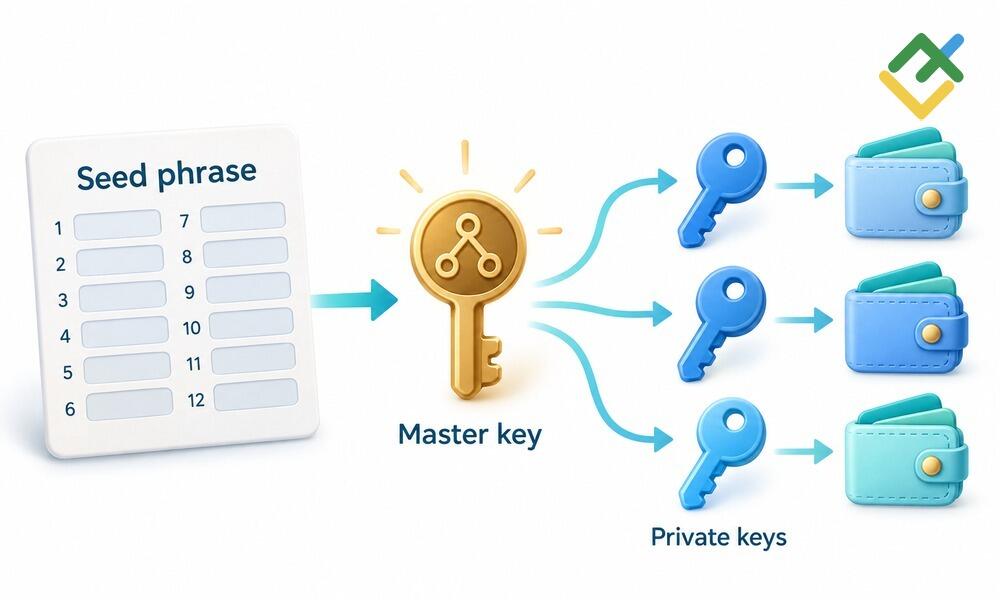
How does a seed phrase work if it only contains words? Each word corresponds to a specific index in a list of 2,048 words. The crypto wallet generates random data, adds a checksum, and divides the result into 11-bit groups. Each group points to one of the 2,048 words in the list. The words, in the correct order, allow this sequence to be recreated. You cannot rearrange them for convenience.
The PBKDF2 algorithm converts your seed phrase into data called a seed, which is then used to generate your wallet's keys. You can also add an optional passphrase for extra security. A master key and derived private keys are then generated. A public key is generated from its corresponding private key and is used to create an address. The wallet app performs all these operations automatically.
A passphrase is a separate parameter. If you used a passphrase, you'll need to enter exactly the same one to restore your original wallet. A different passphrase will generate a different seed. It is an additional layer of security, but it also gives you one more thing you must not forget. The term "master password" is sometimes used to refer to a passphrase. However, a passphrase is different from your wallet app password.
BIP-32 describes how a master private key is generated from a seed and used to derive multiple private keys. The derivation path determines which keys and addresses are generated. BIP-44 and BIP-84 describe different derivation schemes. That's why an empty wallet after recovery doesn't necessarily mean your funds are lost. The app may be using a different derivation path, account, or address type.
For reference: Bitcoin Improvement Proposals (BIPs) are documents that describe proposed improvements and technical standards for Bitcoin. Some of these standards are also used by other crypto wallets.
What Is a 12-Word Seed Phrase
The number of words depends on the amount of initial randomness, known as entropy. For 12 words, BIP-39 uses 128 bits of entropy and a 4-bit checksum. For 24 words, it uses 256 bits of entropy and an 8-bit checksum. The checksum helps detect errors, but it doesn't correct them for the user or guarantee that every typo will be detected.
When generated correctly, a 12-word phrase is practically impossible to crack by brute force using classical computers. A 24-word seed phrase is even more resistant to brute-force attacks. However, this advantage won't protect your wallet if someone gains access to the seed phrase itself.
Don't create your own seed phrase by using random words or words from your favorite quotes. Your wallet should generate the seed phrase using random data.

Seed Phrase vs. Private Key: What's the Difference?
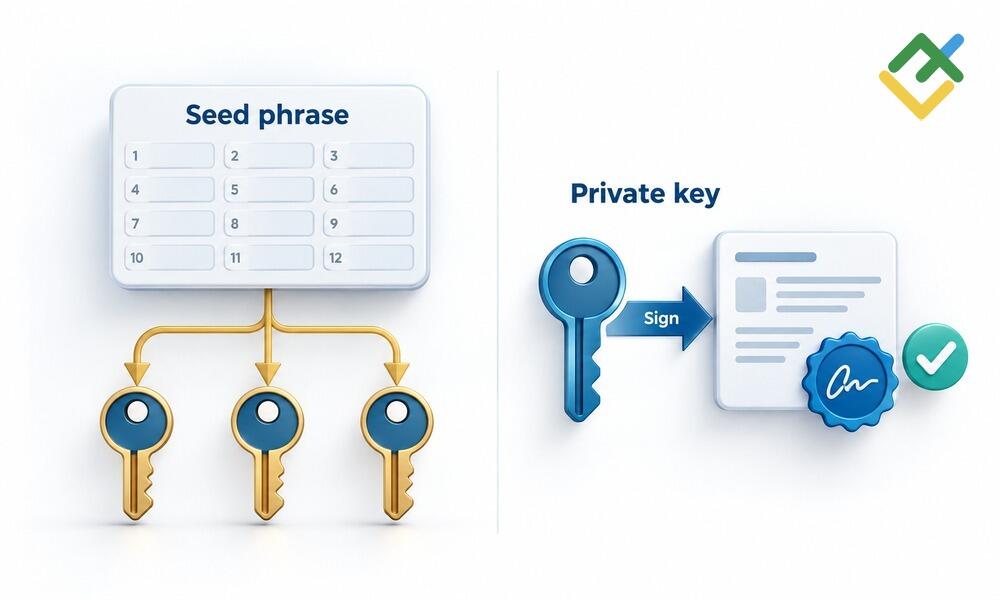
A private key is data used to sign transactions and must not be shared publicly alongside your wallet address. A seed phrase allows you to recover derived keys rather than sign a specific transaction.
The difference between a seed phrase and a private key becomes clear when recovering a wallet. Exporting a single private key does not automatically back up your other accounts. A single seed phrase, by contrast, lets you recover the associated keys, provided you use the same settings. However, you must check separately imported keys individually, as they may have been added to the app after the wallet was created.
When switching phones, you need access to your original keys, not just a familiar interface. A single seed phrase eliminates the need to transfer each branch of keys manually, provided the app supports the required derivation scheme. Different wallets may display the same accounts differently.
A seed phrase must be kept secure because it allows you to recover all the keys associated with it. It's equally important not to lose your seed phrase. If you lose your paper backup but can still access your wallet on your device, you can still manage your funds. In that case, create a new secure backup as soon as possible, if your wallet allows it, or transfer your funds to a new wallet with a securely stored seed phrase.
How to Store a Seed Phrase Safely
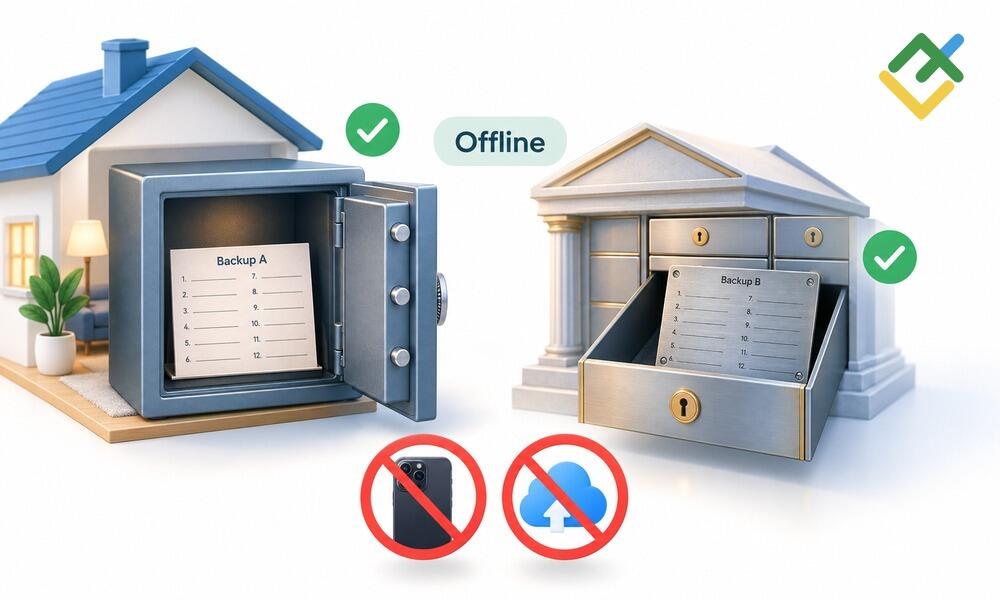
How should you store your crypto seed phrase? Consider who can read your backup and what could happen if your home is damaged. A secure location should protect against both risks, not just keep the backup out of sight.
A seed phrase backup is useless if the words are in the wrong order. During setup, write down the words clearly, number them, and complete the verification process your wallet provides. Don't use a random website to verify your seed phrase. Then decide whether you need multiple copies and where to store them.
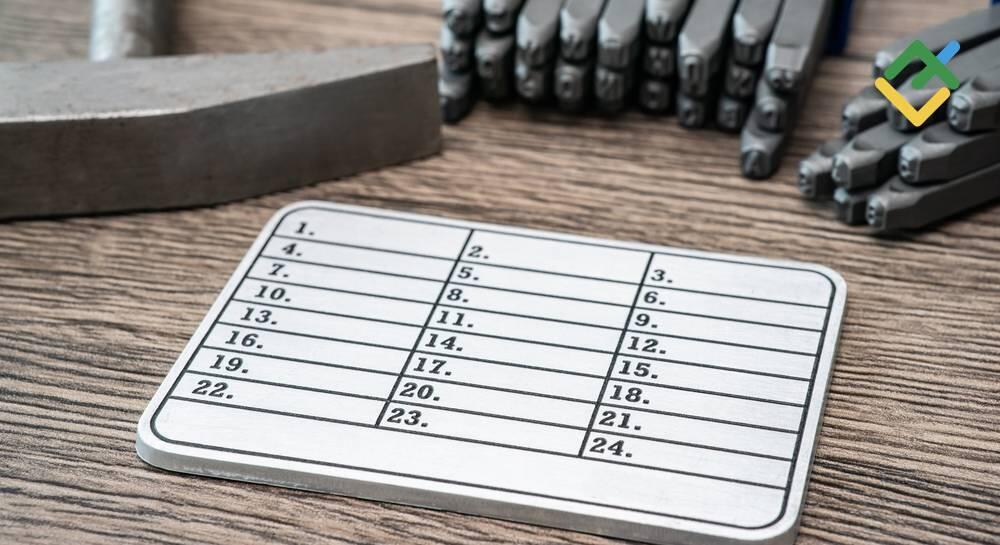
Paper is vulnerable to water and fire. A metal backup's durability depends on how it is made. A bank safe deposit box and a home safe protect against different risks. Consider both how easily you can access your backup and whether someone else could gain access to it.
Cold storage reduces the exposure of your keys to internet-connected environments. A hardware wallet helps keep sensitive data isolated, but it doesn't eliminate the need for a physical backup. You can lose, damage, or replace the device. If this happens, you can recover access to your funds using your seed phrase. That's why it's important to create a backup in advance and store it securely.
There are also other ways to protect your crypto assets. SLIP-39 allows data to be recovered using a specified number of shares, such as three out of five. Multisignature wallets require multiple keys to authorize a transaction. When eliminating a single point of failure, avoid creating a storage system so complicated that you can't recover your wallet later.
What Never to Do With a Seed Phrase
A photo may be automatically uploaded to the cloud, a printout may leave traces in a network printer's memory, and a message sent to yourself may remain on other devices. Your seed phrase should not be shared across services like ordinary notes.
Don't enter your seed phrase into a form to claim a bonus, complete verification, or sync with a website. Wallet support can explain the recovery process, but they should never ask you to share your seed phrase. If someone asks for your secret words, stop sharing information, no matter how convincing they seem.
Download the app from the official website, not from a link sent by someone offering to help. App names and icons can be copied. Don't copy your seed phrase to the clipboard, as malware may be able to read it.

Our Telegram channel
Quality analytics, reviews of indicators and strategies, and some other useful tools for beginner and professional traders.
How to Recover a Wallet With a Seed Phrase
Your seed phrase allows you to recover your original keys rather than create new ones.
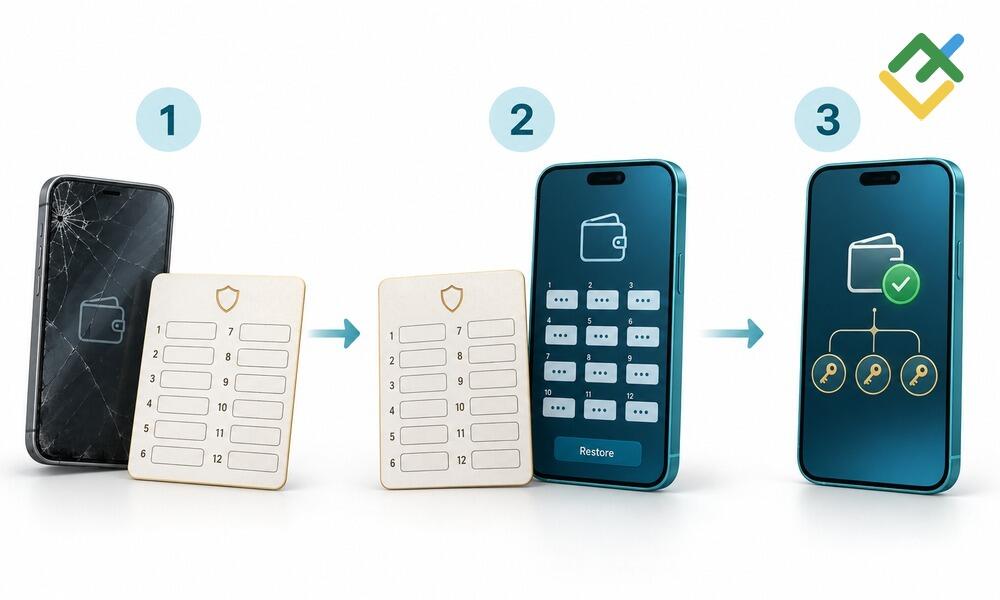
To get started, install a trusted, compatible wallet on your new device. Choose the recovery or import option instead of creating a new seed phrase. Enter the words in the correct order. If you used a passphrase, enter it. Check that you've selected the correct network, address type, and account. Before proceeding, compare the recovered address with the one you used before.
A seed phrase doesn't transfer your balance between phones. The app restores access to your existing crypto assets. Recovering access and sending a transaction are two different operations. If your balance shows zero, check your settings. Don't share your seed phrase with someone who promises to "find your coins."
If you've lost your backup but can still access your wallet, you still have options. Create a new wallet, securely back up its recovery information, and transfer your funds to it. If someone else has obtained your seed phrase, the goal is the same: protect your remaining assets using a new set of keys. Changing your app password won't prevent someone who knows your seed phrase from using it.
If you lose access to your wallet, recovering control of your assets is generally impossible. If you still know part of your seed phrase, recovery may be possible, depending on how much information is missing. However, no one can guarantee success, and you should never share the remaining words with an unverified recovery service.
Seed Phrase Scams and Phishing
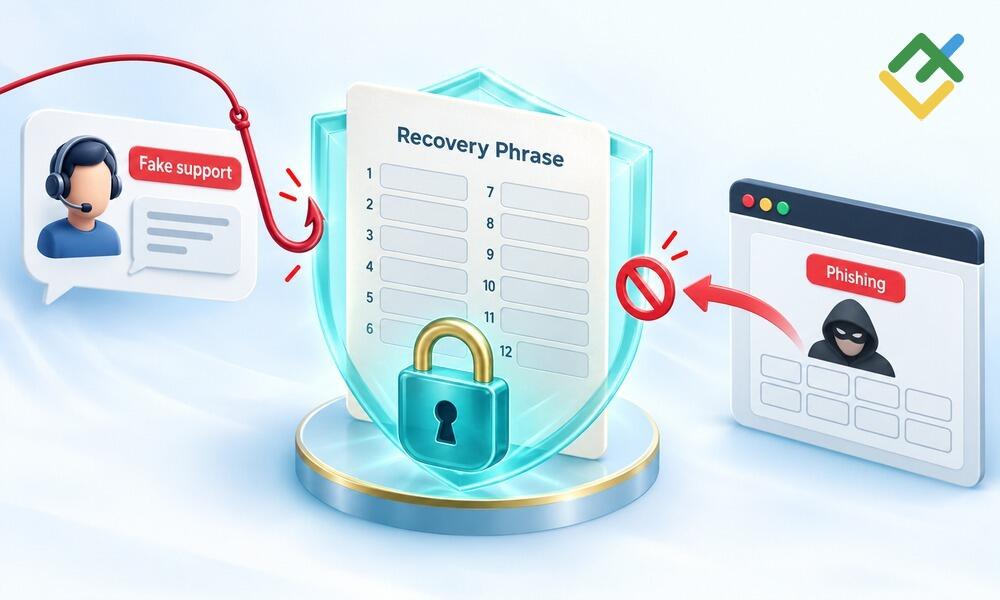
Imagine receiving a message: "After the update, you need to sync your wallet." The link takes you to a familiar-looking page, where a form asks you to enter your seed phrase. Scammers don't need to break encryption. They just need to convince you to share your seed phrase yourself. This type of phishing targets people who are in a hurry to fix a problem.
After you ask a question in a chat, someone claiming to be a support specialist contacts you and offers to view your screen or asks you to fill out a diagnostic form. When it comes to seed phrase security, what someone asks you to do matters more than their job title. Troubleshooting should never require you to reveal your seed phrase.
Sometimes there's no conversation at all. A fake app simply waits for you to import your wallet. That's why crypto security starts before you enter your seed phrase, with checking where the app comes from. If you trade cryptocurrencies, remember that connecting your wallet to a trading platform is different from restoring the wallet itself. Sharing your seed phrase is not a normal part of connecting a wallet.
If your seed phrase has been exposed, take steps to protect your remaining funds. Changing your app settings won't prevent someone else from accessing your wallet using the old keys.
Conclusion
A seed phrase allows you to regain access to your crypto assets if you lose your device. Check in advance that your backup is readable, the words are in the correct order, the storage location is secure, and you know how to restore your wallet.
Your seed phrase is essential for recovering access to your wallet and must be kept secure. However, it doesn't guarantee compatibility with every wallet app. One seed phrase can be used to recover multiple derived keys, but you still need to check the recovery settings.
Using a hardware wallet alone isn't enough to store your seed phrase securely. Write down your seed phrase, verify your backup, and store it securely before something goes wrong, not after a serious problem occurs.
Start trading with a trustworthy broker
FAQs
If someone obtains the information needed to recover your wallet, they can access your keys and control your funds. Changing your app password won't solve the problem. Create a new wallet with a different seed phrase and transfer any assets you still control to it.
When you create a wallet that uses a seed phrase, the app will ask you to write down the words. Write them down during setup and complete the verification process. Whether you can view your seed phrase again later depends on the wallet. Don't assume you'll be able to access it again.
Under BIP-39, the software generates random data and adds a checksum. It then matches groups of bits to words from a predefined list to create a mnemonic phrase. You shouldn't choose the words yourself. A predictable sequence makes your wallet less secure.
If you can still access your wallet and send transactions, transfer your funds to a wallet with a verified backup. If you've lost your seed phrase, access to your wallet, and any separately saved private keys, you cannot recover a standard non-custodial wallet.
Choose a physical backup and store it somewhere protected from unauthorized access, water, and fire. Store additional copies in locations that won't all be affected by the same incident. Secure storage also means making sure you can access your backup when you need it.
The content of this article reflects the author’s opinion and does not necessarily reflect the official position of LiteFinance broker. The material published on this page is provided for informational purposes only and should not be considered as the provision of investment advice for the purposes of Directive 2014/65/EU.
According to copyright law, this article is considered intellectual property, which includes a prohibition on copying and distributing it without consent.