A good calculator is the most useful tool for traders and investors.
What is a Forex calculator? Why do we need calculators for trading? Are there calculators for trading strategies? What is a Forex broker partner calculator? How do Forex calculators work? Find detailed answers to these and many other questions in my article.
What is a Forex calculator and why do you need it?
Trading today involves a lot of calculations, which may me an obstacle for a novice trader. When you started trading, you didn't really expect to be counting and calculating things a lot. You knew how to buy or sell and the only calculation was the pleasant calculation of possible profits. However, when the trading results fall short of your expectations, you might start thinking about what you did wrong. The price has passed 1,000 points and you know that with your volume it equals 100 USD of profit. But for some reason the profit was not 100 but 50 USD. Why is that? Actually, there are several reasons because, the final result depends on a lot of factors, and the main factors are the primary calculations factors.
At the dawn of Forex traders had to do a lot of calculations manually. It took an enormous amount of time and trading ceased to be exciting because of all the calculating. A trader needs to calculate such parameters as cost of one point, size of commission, values of spreads and swaps, size of orders, and then correlate them all with the money management parameters for your deposit. In my first years of conscious trading, the calculations of parameters for a single trade took me about an hour. But, as all know very well, “if you want to earn, you need to work”.
Modern trading has remained unchanged in these matters, and in order to earn now you need to do a lot of calculations, but there is one big difference: you don't have to do them manually - special calculators have been developed for this purpose. Of course, there are still old-school traders who still claculate everything manually (and I am one of them), but most traders now take advantage of the calculators. There are quite a few calculators available now and they are all different. Someone needs to calculate money management parameters, someone needs to calculate commissions and spreads, and someone wants to calculate the size of their affiliate reward in one click. Yes, there are calculators that can do this. I decided to write this article to show you the variety of Forex trading calculators and help you understand the basic principles of their operation. So let's get started.
A little disclaimer. Most brokers on the Forex market have their own calculators and in my review, I made a selection of calculators, which, in my opinion, are the simplest and most accurate.
Forex Trader’s Calculator
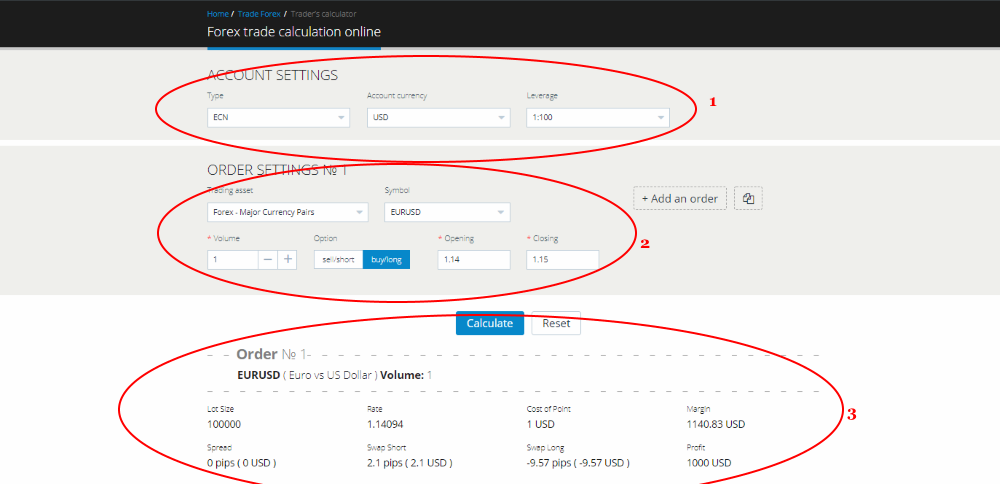
Trader's calculator is the most popular and simple calculator that allows you to calculate such parameters as the size of expected profit for your position in the deposit currency, spreads and swaps for the selected trade volume, and also shows the required margin for the operation. Undoubtedly, these are the most important parameters for a trader. How does it work?
As I said above, I find LiteFinance calculator to be the most convenient trader's calculator. I will take it as an example to show you the principle of operation.
- First of all, you need to enter the parameters of your trading account into the calculator, such as account type (ECN, CLASSIC, or CENT), account currencies (USD, EUR, RUB, MBT, CHF, JPY) and leverage setting on the account (we take it as 1:100). After entering this data, go to step 2.
- Now you set up the properties of the order. Choose the type of trading instrument (currency pairs, indices, or something else), then choose the trading instrument itself, in our case it is the EUR/USD currency pair. You can add several orders and the parameters will be calculated for each order separately. Below you enter the trade volume in lots, in our case it is 1 lot. Next, select the type of operation: buy or sell. Now you only need to enter the opening price and the expected closing price of your trade. After entering these parameters, click “Calculate”.
- After the calculations, below you will see the information for you order: price of one point, commissions, as well as the amount of required margin, and, most importantly, the amount of the estimated profit.
Risk and Reward Forex Calculator
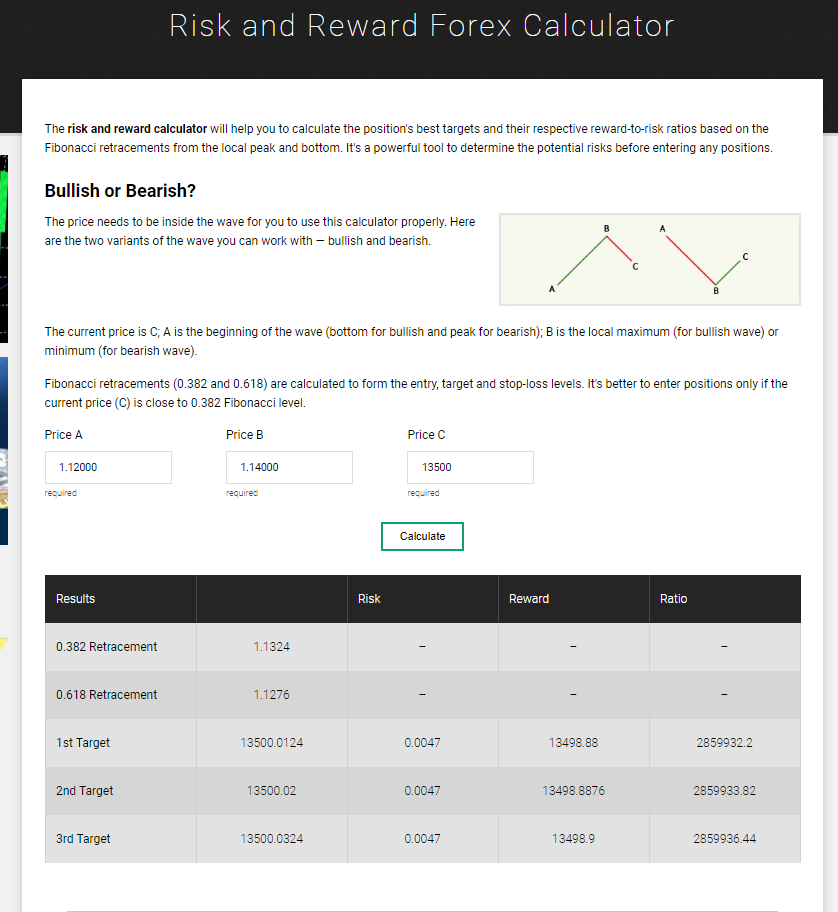
The risk and reward calculator was created to calculate the ratio of risk and potential profit based on key ratios in technical analysis — correction levels and Fibonacci trends.
LiteFinance calculator is the most convenient trader's calculator. I will take it as an example to show you the principle of operation.
- The principle of operation of this calculator is very simple. You enter data for the three points (the beginning of the trend, the end of the trend and the end of the correction) into relevant fields: Price A, Price B, Price C. Then you need to click the “Calculate” button. The calculator will make calculations in accordance with Fibonacci levels.
- In the results window you will see the levels that the calculator offers, as well as the risk and reward ratio for the calculated levels. As you can see, everything is quite simple and convenient.
Fibonacci Calculator

The Fibonacci Calculator was developed based on Leonardo Fibonacci’s number theory. Numerous strategies have been developed on the basis of the Fibonacci number series, and the most popular and accurate of them is the corrections and trends theory. The theory says that there is a series of numerical ratios for different types of trends. Each of the trend types has a series of numeric levels where price consolidation occurs. For correction movements, these values are less than 100% with major levels at 61.8%, 38.2%, and 23.6%. For trend movements, values are above 100% with major levels at 161.8% and 261.8%. The calculator constructs the Fibonacci grid automatically and displays the levels in percentages and quotes.
LiteFinance calculator is the most convenient trader's calculator. I will take it as an example to show you the principle of operation.
- To set up the calculator, you need to enter the trend levels: first you enter the maximum price of the trend, and then the minimum price. Next, select the type of trend (uptrend or downtrend), and finally press the “Calculate” button.
- The calculator will show the levels and the corresponding quotes in the chart. The left column will show the values for the correction movement from 0% to 100%.
- In the right column, we can see the values for a possible future trend with values ranging from 0% to 261.8%. All that’s left is to apply these levels to the chart. I do this with the help of the horizontal lines available in any terminal.
Forex Pivot Calculator
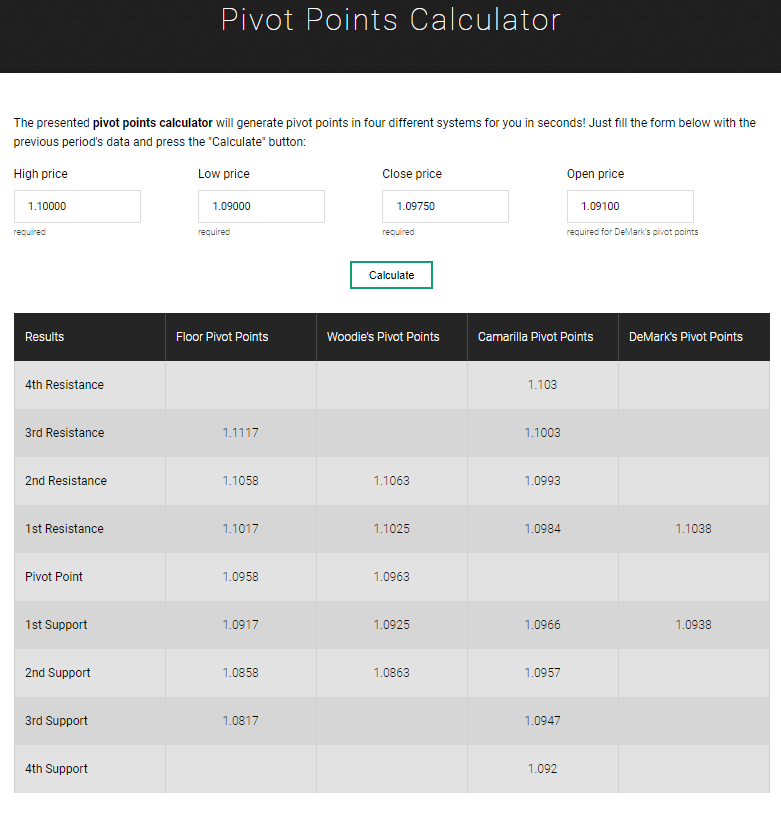
Pivot calculator is a special calculator that calculates the so-called pivot levels. To put it simply, these are trend change levels. We can all agree that trend change points are the most sought-after signal that any trader wants to have. There are many different pivot calculators, but I want to tell you about the one that calculates pivot levels based on four technical analysis theories simultaneously. In addition to the standard pivot levels based on the breaks of trend lines, the calculator also displays the pivot levels based on the theories by Woody, Camarilla and popular DeMark reversal levels.
EarnForex calculator is the most convenient pivot calculator. I will take it as an example to show you the principle of operation.
- To set up the calculator, you need to enter information about the trend for which we will calculate the pivot points. In the first field, enter the maximum price of the trend, then the minimum price of the trend. Then, you need to specify the closing and the opening prices of the candlesticks on the extremes of this trend. They tend to differ from the lows and highs. After entering the data, click the button “Calculate”.
- The calculator will give you a table with different values of support and resistance levels in four different systems. Anyone who is familiar with each of the theories will easily understand the levels that the calculator offers. You just need to apply these levels to your chart.
Forex Partner Calculators
This completes my analysis of the trading calculators and now it is time to talk about the calculators intended for investors or partners.
Almost every broker on the Forex market offers affiliate programs that allow a future partner to earn with the company. You don’t even need to become a trader, just choose a broker you like. Here a potential partner may face a number of problems associated with selecting the broker and the affiliate program, since reliable brokers usually have several of those. To complicate the situation even more, many brokers provide such complicated descriptions for the conditions of these affiliate programs that it is very difficult for an inexperienced person to figure out what exactly they will receive a partner reward for. Partner calculators have been developed to help future partners understand the essence of the affiliate program. They can quickly calculate the amount of commissions for each of the affiliate programs.
Litefinance broker provides one of the most attractive and profitable affiliate programs on the market. I will take their program to show you the principle of operation of these calculators.
Revenue Share Program Calculator
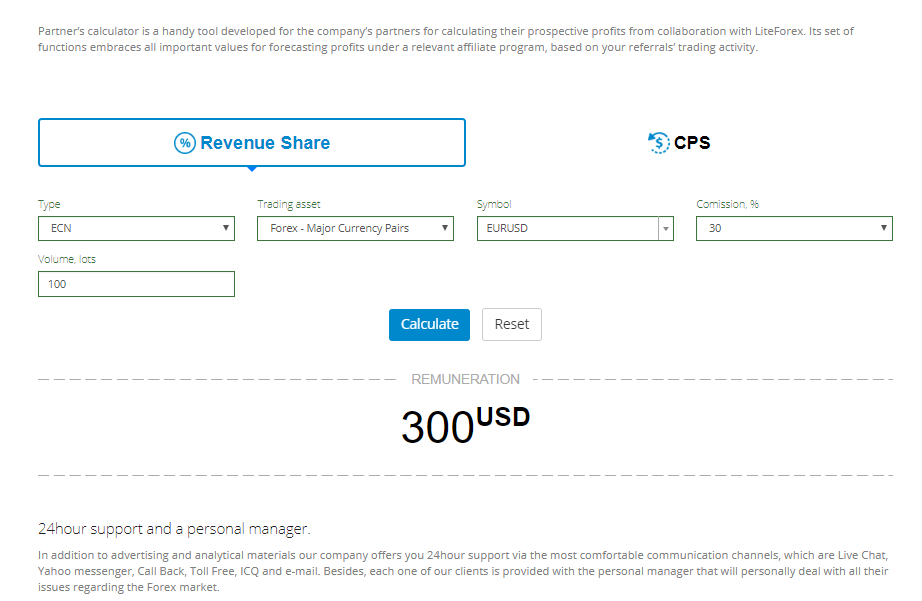
In this type of affiliate program, the participant will receive income in the form of a commission from each trade made by the partner’s attracted clients. What you need to know about the program is the amount of the commission that the broker pays to the partner and the volume in lots traded by the attracted clients.
- To start working with the calculator, you need to select the type of affiliate program. In our case, this is the REBATE program.
- Next, you need to enter trading account type, trading instrument type and the trading instrument itself. After that, you indicate the size of commission – in our case, it’s 30%, and the volume in lots that the attracted clients have traded - 100 lots.
- The data I entered is approximate, as naturally it differs for each partner. As a result of the calculations you get an amount – in our case it is 300 USD. This is quite a considerable reward for the current affiliate program market.
CPS Program Calculator
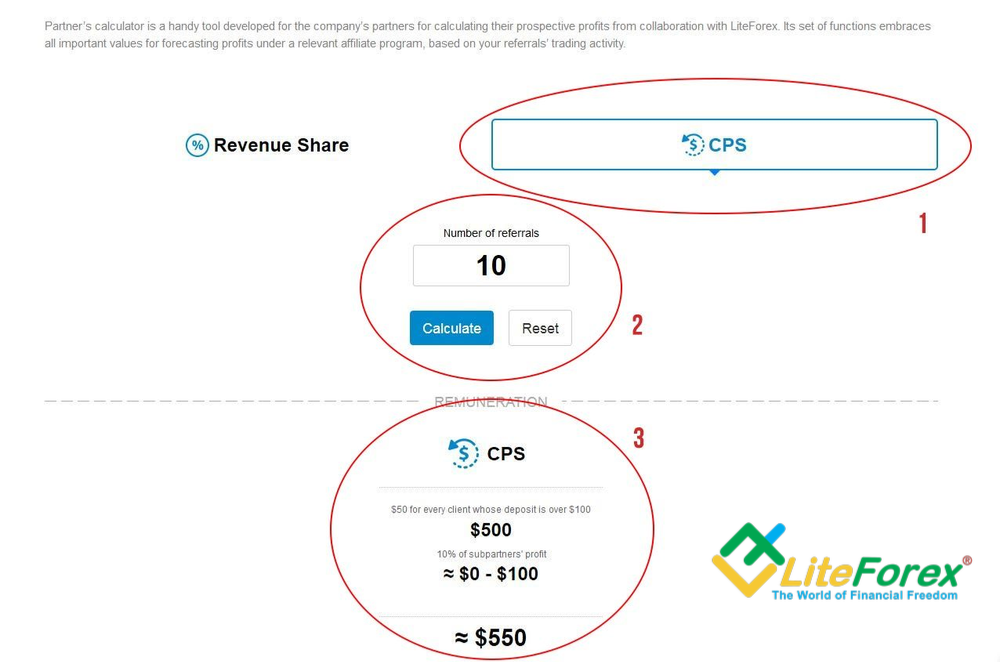
Under this affiliate program, you will receive a reward for each attracted client. If the client has a deposit over 100 USD, the partner will receive 50 USD. Also, the program provides for you to get a share of the profits of your sub-partner. This is the simplest program, and therefore the most popular one.
- To start working with the calculator, you need to select the type of affiliate program. In our case, this is the CPS program.
- Next, you need to enter the number of attracted client with a deposit more than 100 USD and click the “Calculate” button.
- The calculator will show you your final reward amount and what it consists of. This is the amount of rewards for attracting new clients and the share of profits from sub-partners. In our case, this is about 550 USD. This is also a pretty big reward for a partner.
In conclusion, I will say that today it is almost impossible to imagine working on Forex without using calculators. The choice of calculator depends on your goals. In any case, it is much faster and more convenient than calculating things manually. And partner calculators will help you evaluate the profitability of an affiliate program and decide whether you want to work with this broker.
If you liked this article, read and discuss my articles on other topics, I write them for you! Also, remember to share it in social networks - help your friends learn the best methods of making a profit on the Forex market.
P.S. Did you like my article? Share it in social networks: it will be the best "thank you" :)
Useful links:
- I recommend trying to trade with a reliable broker here. The system allows you to trade by yourself or copy successful traders from all across the globe.
- Use my promo code BLOG to get a 50% deposit bonus on the LiteFinance platform. Simply enter this code in the appropriate field when funding your trading account.
- Telegram chat for traders: https://t.me/litefinancebrokerchat. We are sharing the signals and trading experience.
- Telegram channel with high-quality analytics, Forex reviews, training articles, and other useful things for traders https://t.me/litefinance
Price chart of EURUSD in real time mode

The content of this article reflects the author’s opinion and does not necessarily reflect the official position of LiteFinance broker. The material published on this page is provided for informational purposes only and should not be considered as the provision of investment advice for the purposes of Directive 2014/65/EU.
According to copyright law, this article is considered intellectual property, which includes a prohibition on copying and distributing it without consent.