Trading platform MetaTrader 5 is a more effective tool of testing, developing and adjusting of the automatic trading strategies than its predecessor, a popular MT4. However, before starting to use an Expert Advisor on a real account, it is important to understand what parameters are required in order to achieve the best efficiency. The main feature of the MT5 tester is the ability to test strategies, which can be used for several currency pairs.
The article covers the following subjects:
Settings of MT5 tester
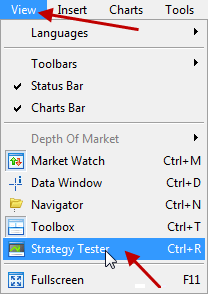
Go to the View menu> Strategy Tester, or use the keyboard shortcuts Ctrl + R.
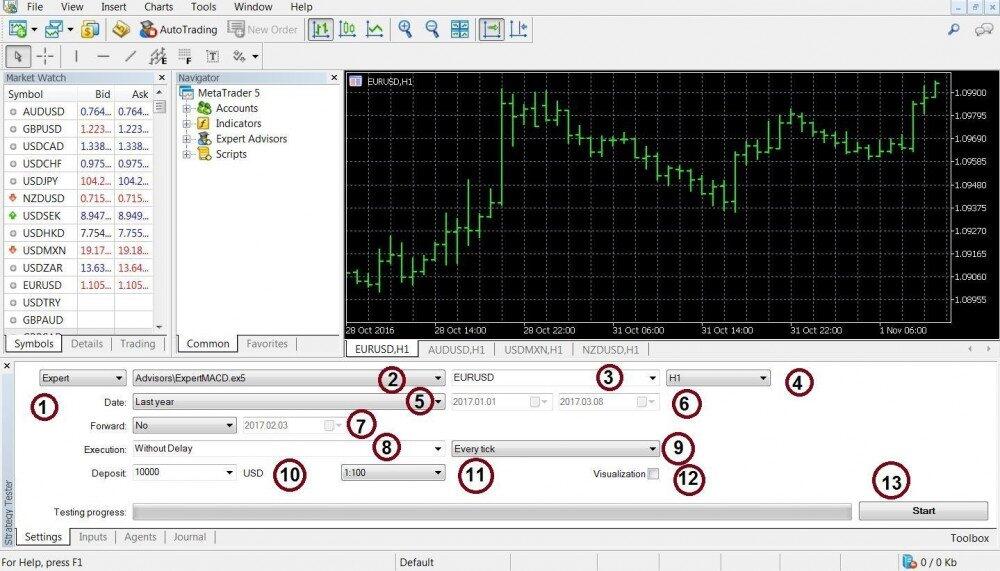
1. In the pop-up menu, select Expert Advisor testing (you can also test the Indicator)
2. Choose an Adviser, which you are going to test
3. Choose a currency pair, which historical quotes will be analyzed by a tester. If you do not find the instruments you want, then, right-click and activate the function Show all in the Market Overview window.
4. Choose the timeframe. There are 21 timeframes available in MT5 — from one minute to a month.
5. Choose testing period from the following options: All History, Last Month, Last Year, or Selected Period.
6. Here, you specify a selected period.
7. Suppose you have set the necessary parameters for testing for the current year. It is possible that these parameters will be relevant only for the current period, future results can be distorted. In this case, we can devide the test into two parts — back and forward. Forward activates retest period for half, third or quarter of the period, or any other period. First, the tester will test data of the back-date interval, and then, the same parameters for the additional time interval. If the results of the forward test significantly differ from the results of the back-test, the parameters are unstable and it is not recommended to use this advisor on a real account.
8. Two trading modes: Ordinary and with Arbitrary delay. The first mode is perfect execution of orders without slippage. The delay mode of the adviser is close to the real trade conditions.
9. Choose the way to generate ticks:
The mode All ticks is for data of one-minute history. This method is quite accurate.
Each tick is based on the real ticks — tests strategies based on the basis of the real tick data provided by a broker. This mode is more complex, but also more accurate with the current floating spread and the use of the real prices.
OHLC on M1 — tests on the history of M1 and uses only the opening, high, low, and closing price levels. When testing in the mode Opening Price Only, the tester takes only opening prices of the bars.
Mathematical calculations mode is when automatic loading of history and ticks are disabled. This mode is often used to adjust the parameters of the Expert Advisor.
10. The size of a deposit — is your real deposit
11. Here we choose the size of the leverage
12. Visualization mode enables a trader to visually evaluate the work of the advisor with the display of trades on the chart.
13. Press start to activate test.
Visual testing
Visual testing is a visual assessment of the Expert advisor on the chart. This function of a tester starts in the visualization window. Before activation this function it is necessary to disable the optimization function (in the test settings).
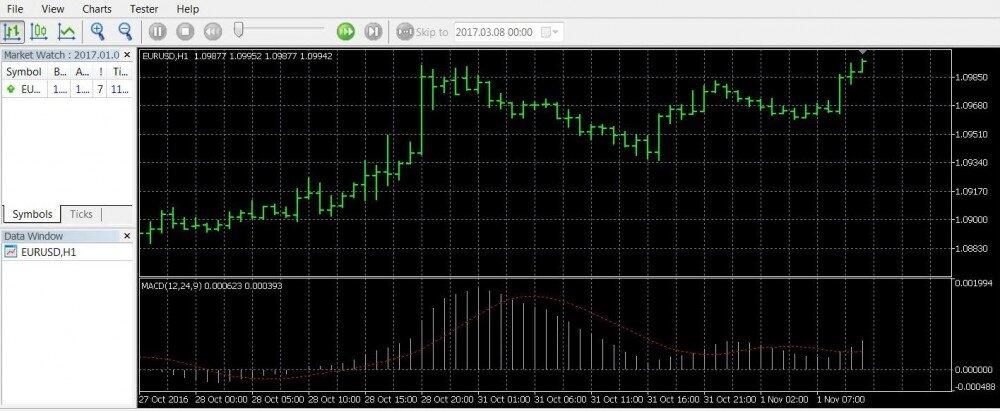
On the top toolbar, configure the display mode of price, scale and speed of testing. In the window “market review” we see information on current prices. In the same window we will see the pairs used for testing. We can see the opened positions, trading history and trading log in the tool window.
How to test multi-currencies strategies
MT5 tester can test strategies applicable to several trading instruments. Therefore, do not forget to activate the display of these instruments in the Market Review window.
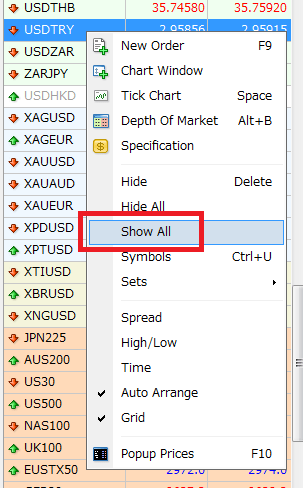
After opening the charts, set the monthly timeframe (M1). Unlike MT4 tester, MT5 tester loads the history of quotes automatically.
Download the multicurrency EA from the Market (Tools> Market).
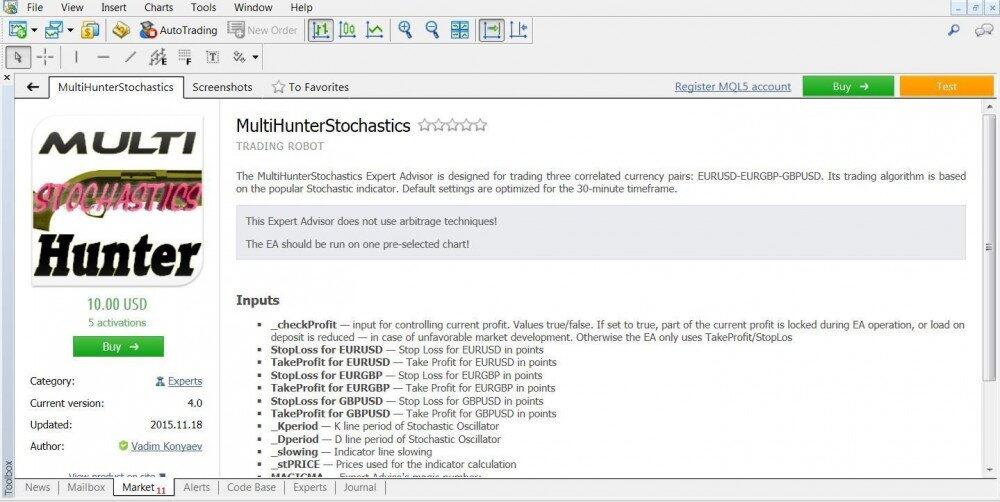
Free, or demo version of one of the payable user experts
After downloading we can connect Expert Advisor to the tester.
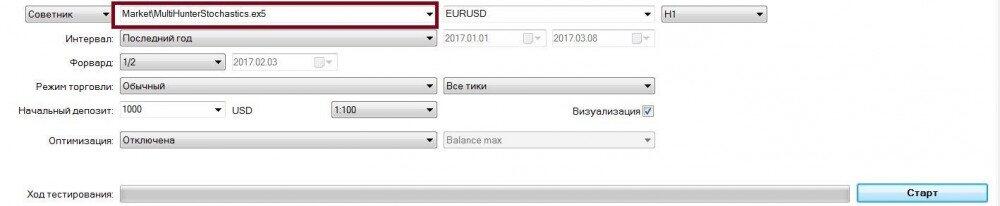
In the parameters we specify the lot (in our case it is 0.1), the interval (in our case it is last year), timeframe and deposit size; then, activate visualization and start.
In the market window we can see the selected instruments, which will be used by our expert advisor.
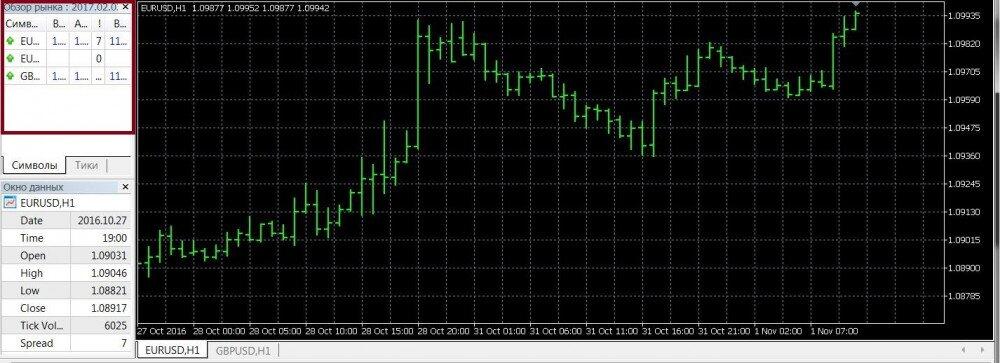
After the completion of the test, we will see the results on the chart tab. The more stable and balanced is the chart, the better our expert is.

MT5 tester is an efficient tool for testing trading strategies. However, the most accurate data is available only when testing a real trading account. It is for sure that MetaTrader5 tester is better than its predecessors, due to the ability to test strategies of the several currencies, loading of the real tick data, and support of the cloud computing service — MQL5 Cloud. These factors make this tester a great tool for pre-testing trading strategies.
By the way, there are a lot of free and demo multicurrency Expert Advisors in the MQL market, which you can test and then give your opinion in the comments.
P.S. Did you like my article? Share it in social networks: it will be the best "thank you" :)
Useful links:
- I recommend trying to trade with a reliable broker here. The system allows you to trade by yourself or copy successful traders from all across the globe.
- Use my promo code BLOG to get a 50% deposit bonus on the LiteFinance platform. Simply enter this code in the appropriate field when funding your trading account.
- Telegram chat for traders: https://t.me/litefinancebrokerchat. We are sharing the signals and trading experience.
- Telegram channel with high-quality analytics, Forex reviews, training articles, and other useful things for traders https://t.me/litefinance

The content of this article reflects the author’s opinion and does not necessarily reflect the official position of LiteFinance broker. The material published on this page is provided for informational purposes only and should not be considered as the provision of investment advice for the purposes of Directive 2014/65/EU.
According to copyright law, this article is considered intellectual property, which includes a prohibition on copying and distributing it without consent.