

A Forex VPS is a virtual private server hosted in a data center that anyone can rent. It reduces latency between the trading platform and the broker from 100–150 ms to 3–5 ms and keeps your trading platform running 24/7, even if your internet connection or power goes down.
Forex VPS is most commonly used by scalpers, algorithmic traders, and arbitrage traders. In this guide, you will learn more about the benefits of a Forex VPS server. We also explain how to rent and set up a LiteFinance VPS step by step.
The article covers the following subjects:
Major Takeaways
- A VPS is a remote server with the capabilities of a regular computer. It hosts a trading platform and keeps it running continuously, even when your computer or mobile device is turned off.
- A Forex VPS is designed for traders who need uninterrupted 24/7 access to their trading platform and open positions. It is commonly used by scalpers, high-frequency traders (HFT), money managers, traders who may experience Internet or power outages, traders who cannot always access their computers, and traders running multiple Expert Advisors that require significant computing resources.
- The main advantages of a VPS are fast trade execution, lower load on your personal computer, 24/7 operation of Expert Advisors, a stable Internet connection, and better protection against cyberattacks.
- You can rent a VPS from an independent hosting provider or directly from a broker. The second option is usually better because the broker's trading servers and the VPS are located in the same data center, which reduces latency.
- When choosing a VPS, pay attention to the processor, RAM, operating system, latency to the trading server, and upgrade options.
- VPS hosting typically costs between USD 5 and USD 50+ per month, depending on the server specifications.
What Is a Forex VPS?
A Forex VPS is a remote trading server that works as a virtual computer and runs 24/7 in a secure data center. It is mainly used for uninterrupted automated trading because the trading platform installed on the VPS continues to open and close trades even when your computer or mobile device is turned off. You can rent a VPS either from an independent hosting provider or directly from your broker.
How a Forex VPS Works
A Forex VPS (Virtual Private Server) works like a remote computer located in a dedicated data center. It has a high-speed internet connection and runs 24/7. Traders connect to the server remotely, install a trading platform such as MetaTrader, and place trades. They can also run Expert Advisors, which trade automatically without user intervention.
The service works in several stages:
- Physical server virtualization. The hosting provider divides a physical server in a data center into dozens or hundreds of isolated virtual servers using virtualization software. Each customer receives dedicated resources based on the selected plan, including CPU, RAM, and SSD/HDD storage.
- Remote connection. You connect to the rented server from your desktop computer, laptop, or smartphone. You see a familiar Windows or Linux desktop, just like on a regular computer.
- Platform setup. You install your trading platform on the remote computer, launch Expert Advisors, and configure your trading environment.
- Automated trading. Once everything is set up, you can disconnect from the VPS and even turn off your own computer. The trading platform keeps running on the VPS, and your Expert Advisors continue to trade automatically 24/7.
A VPS (Forex virtual private server) is a remote computer where you can perform the same tasks as on your own PC.
Advantages of a VPS over a home computer:
- 24/7 operation. Keeping your home computer running all day and night increases hardware wear, creates noise, and raises electricity costs. A VPS runs continuously in a professional data center.
- Low latency to the broker's trading server. At home, trading requests pass through your internet provider and multiple network nodes before reaching the broker's or exchange's server. This usually takes 50–150 milliseconds. During that time, the market price may change, causing slippage. If you rent a VPS in the same city or data center as the broker's or exchange's servers, latency can drop to just 1–5 ms, allowing orders to execute almost instantly at the requested price.
- Better network security. A home computer is more vulnerable to hacking attempts, DDoS attacks, phishing websites, malware, and viruses. This can result in the loss of personal data and even money. A VPS provides stronger protection, while the hosting provider is responsible for securing the server infrastructure.
- Stable internet connection. A home internet connection may become unstable or slow down because of network congestion. A VPS connects directly to high-speed data center networks, providing a fast and stable connection with minimal interruptions.
A VPS is also often recommended for traders who use social trading and copy other traders' positions. If the signal provider trades while you are offline or asleep, you would normally have to leave your computer running. With a VPS, the trading platform stays online 24/7, and copied trades are executed automatically with minimal delay.
Why Traders Use a Forex VPS
The main advantage of a VPS is that it provides a constant internet connection and uninterrupted power supply. It lets you trade 24/7 without putting extra load on your computer, tablet, or mobile device while giving you access to a server with dedicated hardware resources.
Why do traders use a VPS?
- 24/7 trading. Scripts and Expert Advisors run around the clock without your involvement.
- No dependence on your computer. You can turn off your computer or smartphone completely. Your scripts and automated strategies will continue to run on the VPS.
- Protection against power outages. Your trading will continue even if your home loses power.
- Stable internet connection. VPS data centers provide reliable internet connectivity with minimal interruptions.
- Low latency. Order transmission latency can drop to just a few milliseconds. This is especially important for scalping on ECN accounts and high-frequency trading (HFT).
- Less slippage. Faster order execution helps reduce the risk of slippage and improves the chances of executing trades at the requested price.
- Access from anywhere. You can connect to your trading platform from any smartphone or computer, wherever you are.
- Lower load on your home computer. Resource-intensive strategy testing and automated trading run on the VPS instead of your personal computer.
A VPS has two main purposes:
- to keep your trading platform running 24/7 without relying on your own computer, internet connection, or power supply;
- to reduce latency and improve trade execution speed.
Who Needs a Forex VPS
You should use Forex VPS solutions if you:
- Run multiple Expert Advisors at the same time that put a heavy load on your computer. Renting a VPS is often cheaper than upgrading your hardware.
- Use scalping strategies, where every fraction of a second matters. A VPS located close to the broker's trading server can reduce latency.
- Use arbitrage strategies, where fast trade execution is also essential.
- Use trade copying services, where copied trades need to appear on your account as quickly as possible.
- Manage investors' accounts. Running multiple accounts on different trading platforms requires significant computing resources, and you cannot afford connection interruptions.
- Travel frequently. If you only have a mobile device with you, a VPS gives you full access to Forex trading.
- Cannot guarantee that your home computer will always stay online.
Here's an example: MetaTrader includes a feature called Trailing Stop, which works similarly to a stop-loss order. Unlike a regular stop-loss, it follows the price as long as the market moves in your favor and stops once the market reverses.
In MT4 and MT5, Trailing Stop is a client-side feature rather than a broker-side feature. The trading platform must receive price quotes continuously and send updated stop-loss levels to the broker. If the connection is lost, Trailing Stop stops moving and remains at the level reached before the disconnection. When you use a VPS, Trailing Stop continues to work even if your computer loses its internet connection or is turned off.
How to Choose a Forex VPS
One of the main criteria when choosing a Forex VPS is the lowest possible latency to your broker's trading server. The lower the response time in milliseconds, the faster your orders are executed and the lower the risk of price slippage.
Criteria for choosing a VPS server:
- The processor (CPU) determines how quickly tasks are processed and how smoothly trading platforms run.
- The memory (RAM) affects how many applications can run simultaneously without reducing performance.
- The storage (SSD/NVMe/HDD) provides space for the operating system, trading platforms, and log files.
- The operating system is typically Windows for MT4/MT5, while Linux is commonly used for other applications.
- Latency (ping) to the broker's server: the lower the latency, the faster trading orders are executed.
- Uptime indicates the reliability of the server. It is recommended to choose a VPS with an uptime guarantee of at least 99.9%.
- Data center location. The closer the server is to the broker's infrastructure, the lower the data transmission latency.
- Scalability allows you to increase CPU, RAM, or storage resources without migrating to a new server.
- Backup and data protection.
The required VPS specifications depend on your trading needs and the expected server workload.
Server Location and Latency
The location of a Forex VPS directly affects the speed of data transmission between the trading platform and the broker's server. The closer the server is to the broker's or exchange's infrastructure, the lower the latency (ping) and the faster client orders are executed.
Ping is the time it takes for a signal to travel between the client and the server. It depends on both the physical distance and the number of intermediate network nodes. When trading Forex from a home computer, the signal passes through the following route:
- from the trading platform to the router;
- from the router to the internet service provider;
- through internet exchange points and backbone network nodes;
- across countries and data centers;
- from data centers to the broker's or exchange's server.
A ping below 20–30 ms is generally considered good. For automated systems, a latency of less than 10 ms is recommended. A low-latency Forex VPS is especially important when using Forex trading robots, scalping, and other strategies where even a fraction of a second can affect order execution.
High latency increases the risk of price slippage and may cause orders to be executed at less favorable prices, especially during the release of major economic news or periods of high market volatility. When choosing a Forex VPS hosting provider, be sure to check the data center location and the average latency to your broker's servers in advance.
Without a VPS, when the trader's computer and the broker's server are located in different countries, latency is typically 100–150 ms. With a high-speed Forex VPS, latency can be reduced to 3–5 ms.
Specs, Uptime, and Reliability
1. Specifications: processor, memory, and storage capacity. For most traders who do not use resource-intensive analytical tools or Expert Advisors, a VPS with 1–2 CPU cores and 2 GB of RAM is sufficient. Storage capacity depends on your individual requirements. The amount of storage you need depends on how much historical price data you plan to download and how many trading instruments you intend to use.
Important: Before renting a VPS, be sure to check whether you can upgrade its hardware resources without migrating to a new virtual private server. Also check whether a free trial period is available for testing the VPS.
2. Uptime is the percentage of time a server remains available without interruptions. High uptime is achieved through backup power supplies, multiple internet connections, and professional-grade equipment in data centers.
An uptime of 100% is virtually impossible over the long term because servers require periodic maintenance and updates. 99.9% (Three Nines) is the standard for a reliable hosting provider and corresponds to approximately 43 minutes of downtime per month. 99.99% (Four Nines) is an excellent level of availability, with approximately 4 minutes of downtime per month. Anything below 99.0% is considered poor and means more than 7 hours of downtime each month.
Forex VPS Hosting from LiteFinance
LiteFinance offers its own VPS hosting service on competitive terms. Every client can choose from one of four plans:
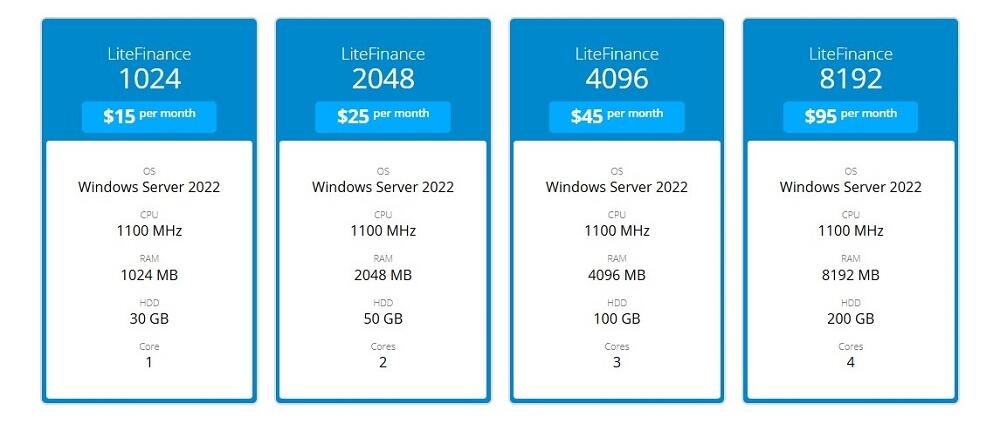
The first Forex VPN plan is designed for running scripts. The second plan is ideal for running 1–3 simple trading bots that execute up to 10 trades per day. The third plan is suitable for running multiple trading platforms simultaneously. The fourth plan is designed for professional traders, trading system developers, money managers, and professional copy trading.
LiteFinance VPS: Key Benefits
The main advantages include:
- LiteFinance VPS servers are powered by Microsoft Hyper-V virtualization technology, which is based on a 64-bit hypervisor isolated from the host operating system. This ensures that all resources included in your hosting plan remain available at all times, regardless of the load on the company's servers.
- Ultra-low latency (minimum ping). The hosting server is located in close proximity to the broker's trading infrastructure, minimizing latency. Ultra-fast order execution helps reduce the risk of slippage when opening and closing positions.
- Complete autonomy and 24/7 operation. MetaTrader trading platforms run continuously in real time. Expert Advisors continue opening and closing trades even if your home internet connection fails or there is a power outage. They keep running even when your local device is turned off.
A LiteFinance Forex VPS service is an ideal solution for stable, uninterrupted trading without technical disruptions. Connect to a virtual private server today to ensure reliable trading.
How to Set Up the LiteFinance VPS
The process of connecting to a LiteFinance remote VPS server consists of two stages: renting a VPS through the Client Profile and connecting to it after receiving your access credentials.
Stage 1:
1. Register and complete the verification process. To connect to a remote server, you need a Client Profile with identity verification completed. You may also need to verify your payment method for bank payments.
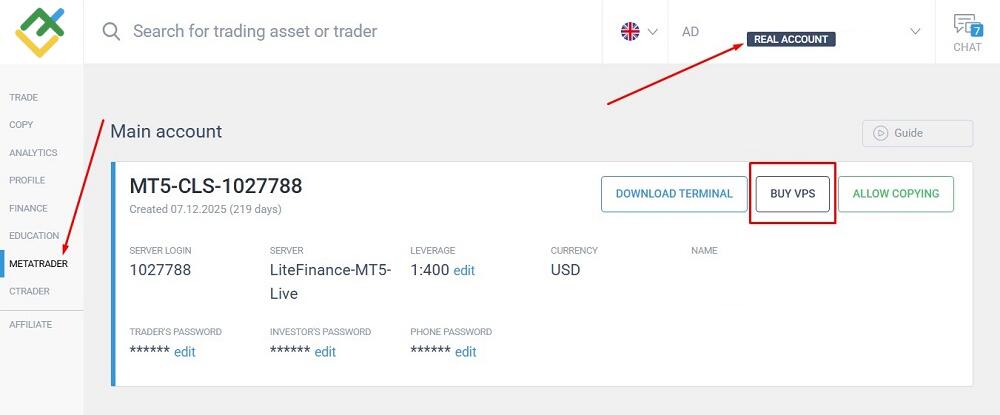
2. Log in to your Client Profile. In the menu on the left, select "MetaTrader". In the profile of your main trading account, click "Buy VPS". Please note: A VPS can only be connected to a live trading account. This option is not available for demo accounts. Your trading account must also have a positive balance. If the balance of your live account is zero, the option will not be available.
3. Select the plan that best suits your needs. Confirm that you have read and agree to the VPS Terms of Use. Check the Auto-renewal box if you would like to renew your VPS subscription automatically.
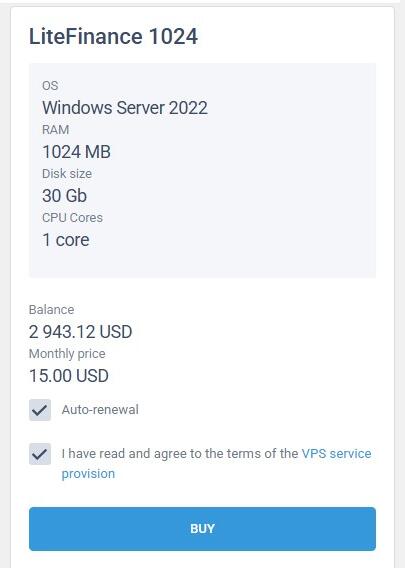
4. Click "Buy". An email containing your Forex VPS connection details will be sent to the email address associated with your Client Profile. The email will include the remote computer's IP address, username, and password.
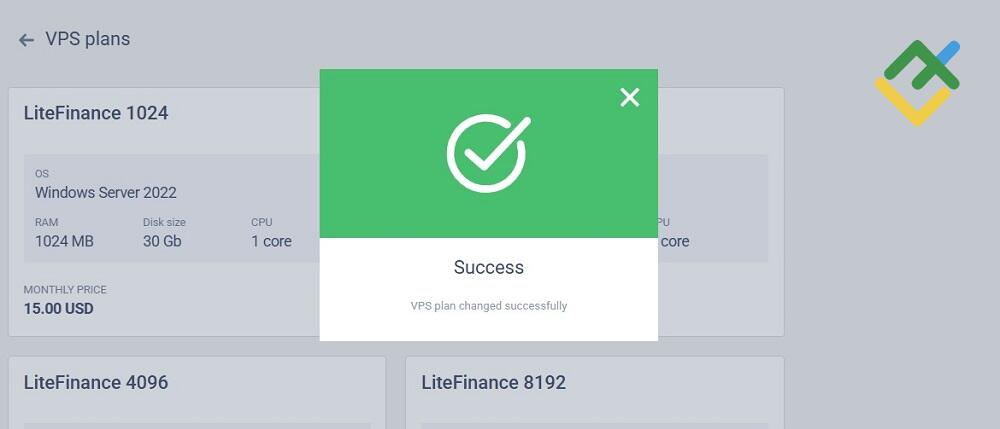
Important! You can upgrade to a higher-tier VPS plan at any time. However, you can switch to a lower-tier Forex VPS plan only after the current subscription period expires.
Stage 2 – Connect via Remote Desktop
1. Open the Remote Desktop Connection application on your Windows computer. Depending on your Windows version, its location and name may vary. If necessary, use Windows Search (next to the Start button) to find it.
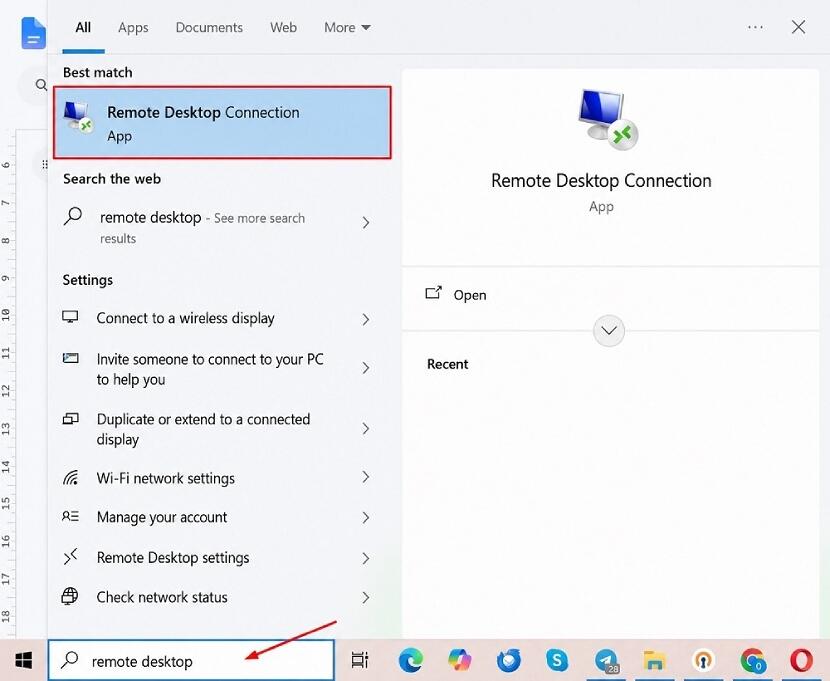
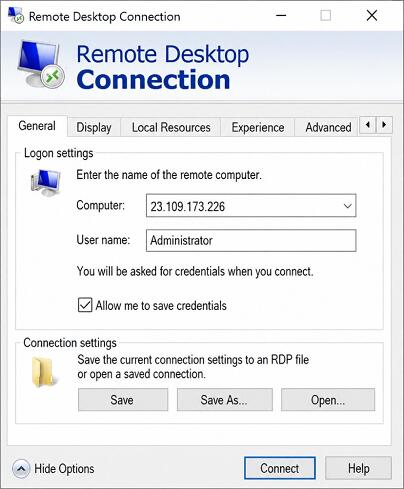
2. In the Remote Desktop Connection window, click "Show Options". Enter the credentials from the email: Computer — the IP address; User name — Administrator. Check the "Allow me to save credentials" box.
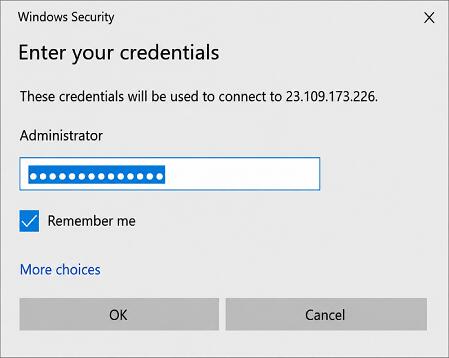
3. When prompted, enter the password provided in the LiteFinance email.
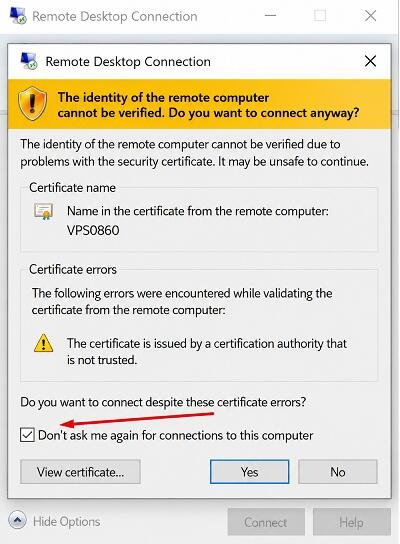
4. If a certificate warning appears, check the "Don't ask me again for connections to this computer" box.
The connection is now complete. A standard Windows desktop will appear.
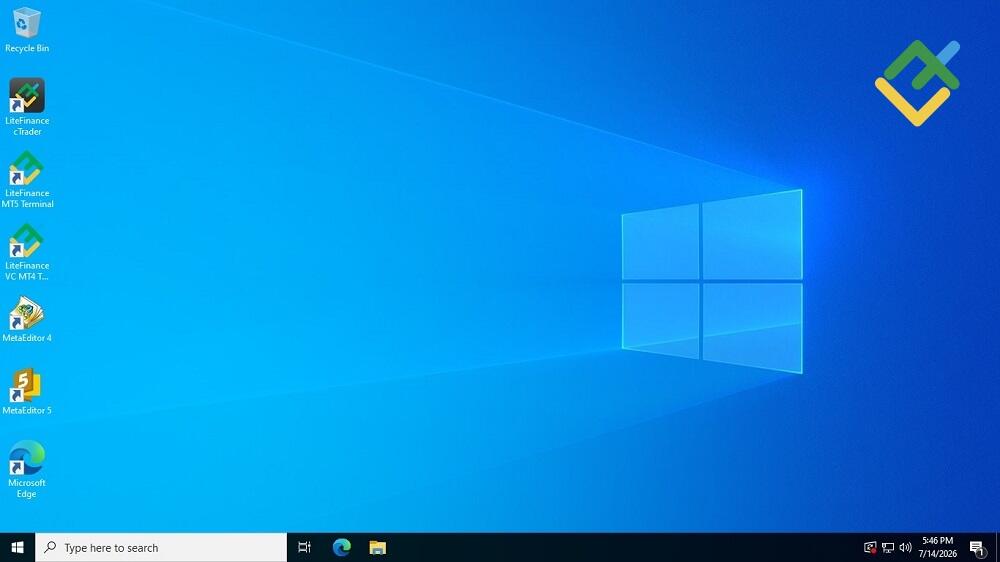
From this point, you can use the VPS just like your personal computer: install a browser, sign in to your LiteFinance Client Profile, launch the trading platform, download scripts and Expert Advisors from the internet, and run them in the platform. The only difference is that all files, trading data, Expert Advisors, and logs are stored on the remote server instead of your local computer.
Conclusion
A Forex VPS is best suited for experienced traders who use Expert Advisors, PAMM accounts, or trading strategies such as scalping and social trading. If you trade with multiple Forex brokers, an independent Forex VPS provider is the better choice. If you trade with only one broker, using its VPS service is usually more cost-effective. For more information about LiteFinance VPS services and pricing, please visit the company's official website.
VPS Service FAQs
The monthly cost of a Forex VPS typically ranges from USD 5 to USD 50, depending on the server specifications, data center location, and other features. Some brokers offer VPS hosting free of charge if you maintain a specified trading volume or minimum account balance.
For comfortable trading, a processor (CPU) with at least 2 cores for a single MT4/MT5 platform and at least 2 GB of RAM are recommended (4 GB or more if you run multiple Expert Advisors). Storage: 10–25 GB SSD for the operating system, historical price data, and terminal logs.
Yes, if you use high-frequency Expert Advisors or trailing stops. A VPS provides redundant internet connections and uninterrupted power, helping keep your trading platform online. You can also access it remotely from your smartphone via Remote Desktop.

The content of this article reflects the author’s opinion and does not necessarily reflect the official position of LiteFinance broker. The material published on this page is provided for informational purposes only and should not be considered as the provision of investment advice for the purposes of Directive 2014/65/EU.
According to copyright law, this article is considered intellectual property, which includes a prohibition on copying and distributing it without consent.