Ilan expert advisor and its variations
Any modification of the Ilan expert advisor is a controversial tool. This a variation of a grid advisor, the Expert Advisor that trades not by signals, but by the grid of orders. The important parameters here are the step (the distance between orders), direction, and limiting the risk.
To compensate for losing trades, Martingale has been added to the system, allowing one profitable transaction to cover the previous loss. But Martingale in Forex bears a risk to lose the entire deposit if there is a series of losing trades.
In Ilan, this problem is partially solved by the averaging of the trades entered, but the principle is the same, you can either lose everything or gain 30%-50% or more in just a month. Are you interested? Let us study the Ilan expert advisor together!
Ilan trading system – a martingale-based expert advisor for those who like risk and excitement
The Ilan trading system is also known as an Expert Advisor. At least, according to query statistics, the combination “Ilan strategy” is searched for only 10 times a month, while the request “Ilan Expert Advisor” accounts for more than 300 requests. This tells us about people see this trading system in general.
Besides, the Ilan trading system is one of the most discussed in the trading forums. And there is quite much criticism of it, although it just confirms the constant interest in this strategy. First of all, the criticism concerns the Martingale system used in it, which is considered to bear high risks and even be the reason for losing the entire deposit.
On the other hand, trading the Martingale way in Forex allows taking quite big profits. What about the risk in this case? You will find the answer to this question and many other ones in this overview.
From this article, you will learn:
- What is the Ilan trading system: principle, advantages, and disadvantages.
- How to trade with the Ilan Expert Advisor, optimal settings of the EA.
- Risk optimization in trading with the Ilan Expert Advisor
- Ilan Expert modifications
The algorithm of the Expert Advisor is rather complex. If you find any technical errors in the article, please write in the comments!
Ilan Expert Advisor and its modifications: fundamental features, differences, and settings
The Ilan trading system attracted the interest of traders in 2007 when the Expert Advisor based on it won the first prize in the international championship of trading robots. Originally, the trading strategy suggested the direct participation of the trader. Now, modern modifications of the Ilan EA can trade automatically without human interference at some intervals. However, on some trader forums, it is not recommended to leave the EA to trade alone.
Ilan is a trading robot based on the grid strategy, which makes profits not on the search of signals but on placing a grid of orders, which should yield profits if the Martingale coefficient and trade volume are selected correctly. A big proportion of losing trades is compensated by a few winning trades.
Important! A trader’s task is to select the setting of the EA that directly influence the risk level:
- Martingale coefficient. This is the number that will multiply your trade amount on each next order.
- Grid step. This is the distance between the orders. A big step is not sensitive to short market moves. The longer is the step, the longer timeframe is needed.
The less is the risk (stop loss), the less profit the EA makes. With a conservative approach, the EA will be unprofitable due to the spread and the time spent. If you want to gain, be prepared to lose.
To turn losing into trades into a profit, you need to use the mechanism of adaptive averaging of the total position. The common grid trading approach suggests placing orders with an increased position in the initial direction until the price does turn around.
The averaging mechanism, used in some modifications of the EA, allows you to make profits from trades entered in both directions on the local corrections. If you want, you can study the algorithm of placing the grid of orders in more detail. But bear in mind that in different EA the algorithm may be different.
What you need to know about Ilan trading system:
- This forex trading system is designed to trade only currency pairs. It doesn’t work in the stock or commodity market.
- The system employs indicators, but the indicators used may differ depending on the EA modification. For example, it is written nothing in the description of the first Ilan version. The limiting of the risk is included in the settings, but a stop-loss option is not designed.
- There are at least 12 modifications of the Ilan (I will describe some of them later). There is no ideal EA, so each modification has its advantages and flaws.
- Trading the Martingale way in the long term will eventually result in the loss of the deposit. But, if you withdraw the profit from time to time (do not increase the deposit), you trade quite successfully with the Ilan Expert Advisor.
The system is based on trading the short-term market moves. Trades are exited with a fixed take profit of 5-20 pips, which allows you to make profits on the market moves in both directions. Differently put, the EA doesn’t use trend strategies.
Flaws of the Ilan Expert Advisor (any modification):
- You need quite a big deposit that can stand with a series of losing trades corrected by the Martingale coefficient. You can learn more about the risks of trading the Martingale strategy in this article.
- It is more convenient to exit trades manually, it will allow you to reduce the loss from Martingale. So, you need to constantly monitor the chart.
- When there is a strong trend in the market, your positions can be closed with the stop out if you wrongly calculated the lot size, the martingale coefficient and the step between the orders (one of the below Ilan modifications is completed with the Excel table that helps you calculate the minimum amount of the deposit).
- You should always have your computer switched on (all modifications of the EA are designed to work 24 hours a day). If you have problems with a stable Internet connection, you’d better use a VPS (the rent is paid).
- According to the comments on forums, backtesting on the historical data doesn’t show the real performance. The EA, in all its modifications, reacts to the price gaps, news releases, and so on. The upward equity in the backtest doesn’t mean that you will make profits in real trading, and vice versa. +6
- Sooner or later, the Ilan EA will destroy the deposit after a series of losing trades. It can yield profits for a day, week, month, but, at some point, the deposit will disappear. Your task is to make profits over this time and withdraw the amount of money that is bigger than the potential loss.
The advantages include a potential possibility to earn from 1000% per annum or more (in a trending market).
How to add the Expert Advisor to MT4 Forex. In the brief follow-up reviews of several Ilan modifications, I offer a free template. Download the archive.
Click “File-Open Data Folder” in the MT4 top menu. Next, you follow the address MQL4 – Experts. Next, you paste the Expert into this folder and restart the MT4. Next you open “Tools-Options” and switch on “Allow automated trading” in the Expert Advisors tab.
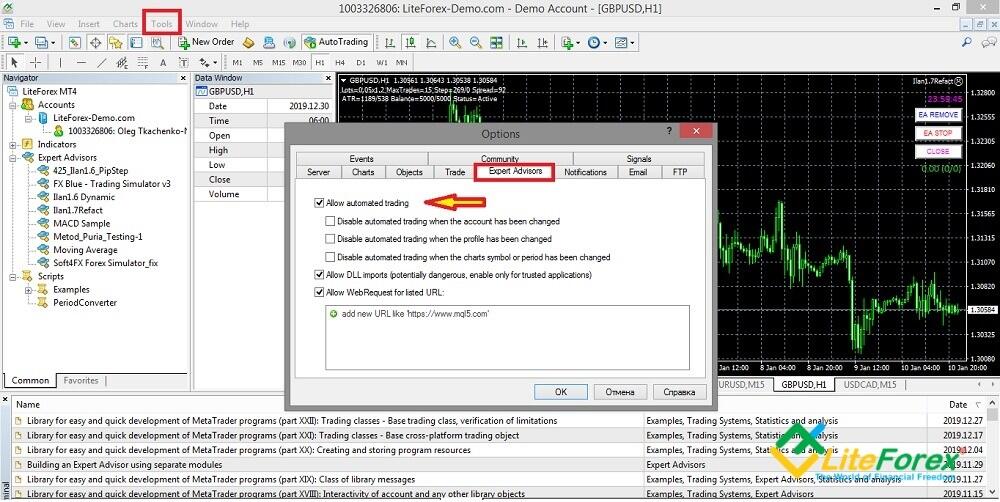
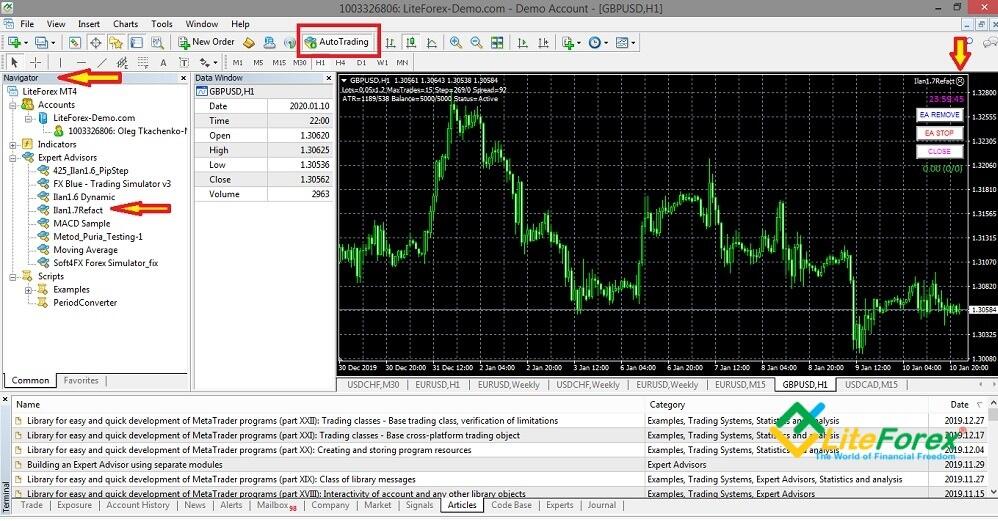
Find the Expert in the left menu “Navigator” and drag it to the chart. Switch on the option “Allow Expert to trade”.
If everything is correct, there will appear a smiling face in the top right corner of the chart. (if the face doesn’t smile, the Expert isn’t working). To stop the EA, select “Disable automated trading” in the top menu.
Ilan 1.0
This is the original version of the Expert working on the hourly timeframe. It is designed for all major currency pairs. A trade is entered at the beginning of every hour.
- A long position is opened when the previous hourly bar closes higher than the bar one hour ago.
- A short position is opened when the previous hourly bar closes lower than the bar one hour ago.
It doesn’t matter for the EA in which direction to open the position. It spots the short-term trend based on the most recent two bars and enters a trade in the trend direction. If the price reverses, the next trade is multiplied by the Martingale coefficient, which is specified in the settings, in the original direction (counter the trend).
The Ilan is thought to be unique among forex robots because it doesn’t search for good entry points but manages the existing positions. This allows us to compensate for the losing trades with the winning ones. This version is thought to be out-of-date, so, I won’t give its template here.
Ilan 1.6 Dynamic
Although this modification is not the most up-to-date, it is considered to be the most successful and popular in practical trading. It includes the RSI indicator that provides an entry signal (when the price goes outside the overbought/oversold zone), and the CCI, according to which the EA exits the grid of orders (when the oscillator breaks the level indicated in the settings). When the indicator is attached to the chart, the first trade is entered almost instantly (sometimes, you need to wait for about 15 minutes).
The EA works with all liquid currency pairs on the five-minute timeframe. You can trade forex or employ it in binary options. The recommended minimum deposit is 1000 USD. The working principle here is similar to the trading algorithm of the previous version.
Stop losses are not set automatically, trades are exited with the take profit. If the price goes in the opposite direction Ilan enters another trade in the same direction as the previous one.
Inputs and parameters of the Ilan Expert Advisor:
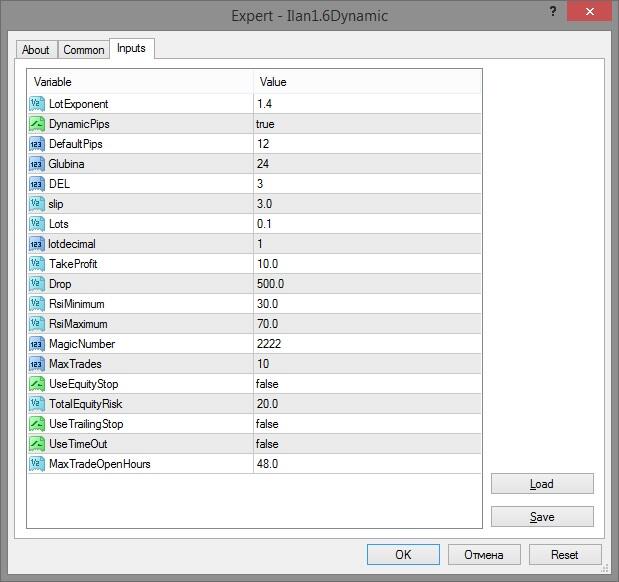
- LotExponent. It is the lot multiplier or the Martingale coefficient. Each next trade is entered with a lot multiplied by this value.
- DinamicPips. Trading type (static or dynamic). In the first case, each next order is put at a distance set by the trader in the DefaultPips parameter. In the second option, the EA defines the distance to put the next order itself.
- DefaultPips. It is the distance between orders. The higher is the value, the longer is the distance between the orders. If you increase the value manually, you can optimize the risks in a long trend.
- Glubina is the number of bars that the Expert analyses before putting the first order. It is used to estimate the current volatility.
- DEL is the parameter used to calculate the distance between the orders. It is active when the static mode is on.
- Slip is the slippage limit (the deviation of the actual price from the set) in pips.
- Lots is the lot volume.
- Lotdecimal is the type of lot that is calculated, i.e. the number of decimal places in lot calculation (normal, mini, micro). It depends on the account characteristics specified by the broker.
- TakeProfit is the level at which all orders in the grid are closed.
- Drop is the CCI level where the grid of orders is closed earlier.
- RSI Maximum/Minimum are the borders of the overbought/oversold zones. When the price goes beyond these levels, the EA closes orders.
- MagicNumber is a unique number assigned to the EA’s trades to distinguish them from other trades.
- UseEquityStop enables the option that limits the maximum loss.
- TotalEquityRisk is the maximum percent of the loss. For example, if the value is 30, all existing positions will be closed when the equity loss is 30%.
- UseTralingStop enables trailing stop.
- UseTimeOut. By default, exit by time is not used, but you can enable it by setting this variable to true. The orders, which have been opened longer than the specified value, will be closed.
- MaxTradeOpenHours. The number of hours since the opening of the first position after which all positions are closed.
There are no strict recommendations on the parameters’ values. So, I recommend running the EA on a demo account with the default values and then decide what options should be changed, according to your trading style (conservative or aggressive). The template can be uploaded here.
Ilan 1.7
Ilan refact 1.7 is a modified version of the Ilan 1.6 Dynamic. It also employs the RSI signals. Buy and sell trades are entered simultaneously in the 5-minute timeframe in the same chart of an instrument. Differently put, when you launch it on the chart, the EA enters two orders in the opposite direction at the first RSI signal.
Features of the Ilan 1.7 Expert Advisor:
- Take profit. Unlike the previous modifications, the Ilan 1.7 doesn’t use a take profit when entering the first trade.
- Depending on the direction where the price will go after the first two orders are put, Ilan will continue placing orders against the trend. Starting from the second order counter to the trend, the EA sets a take profit. Why? This was introduced by the designers.
- It trades on cent accounts. This modification is considered to be more aggressive than Ilan 1.6 Dynamic. Because of the high risk and the necessity for a big deposit, it is not recommended to launch Ilan 1.7 on normal accounts.
- The timeframe is M5. Trading instruments are EUR/USD, GBP/USD, AUD/USD, EUR/JPY currency pairs.
You can download the template of the EA here. The parameters and the values of Ilan 1.7.
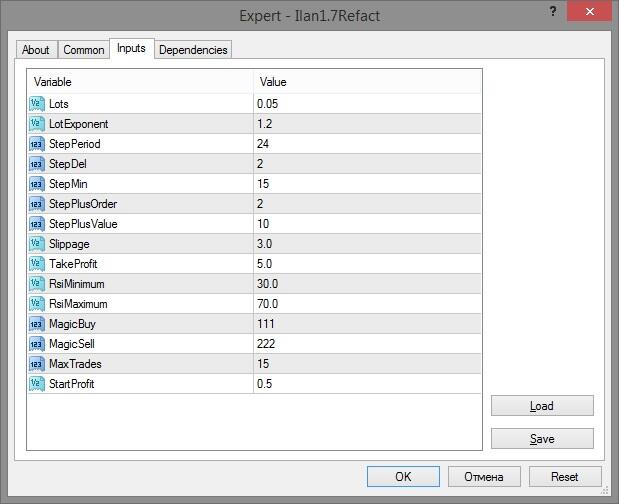
- Lots. It is the original lot size.
- LotExponent is the lot multiplier for each new order in the grid (Martingale coefficient).
- StepPeriod is the period that defines the step of the grid.
- StepDel is the grid step divisor for the period.
- StepMin is the minimum grid step (in pips).
- StepPlusOrder is the order number in the grid, after which, each next order is multiplied by the LotExponent coefficient.
- StepPlusValue is the increment value for the step in the grid after there is put the order specified in StepPlusOrder.
- Slippage is the level of maximum allowable slippage (in points).
- TakeProfit is the profit level in points where the grid of orders closes.
- RSIMinimum/RSIMaximum is the indicator levels, according to which the EA defines entry signals when it places the first order.
- MagicNumber is the unique number of buy and sell orders.
- MaxTrades is the maximum allowable number of orders in the grid
- StartProfit is the level of profit for the first order, where the trade is exited if the opposite order is not entered.
There are several buttons in the upper right corner of the chart. EA Remove removes the robot from the chart, EA Stop disables the EA (the face remains “smiling” at the same time), the Close button closes orders. Information on the grid parameters is displayed in the upper left corner: the current spread for the pair, the current step in the grid, volatility (ATR) for 10 days, and the last 24 hours, the number of open orders in both directions, etc.
If the platform restarts, the existing orders do not close, the EA continues to work as it did until the platform was closed (Internet break occurred).
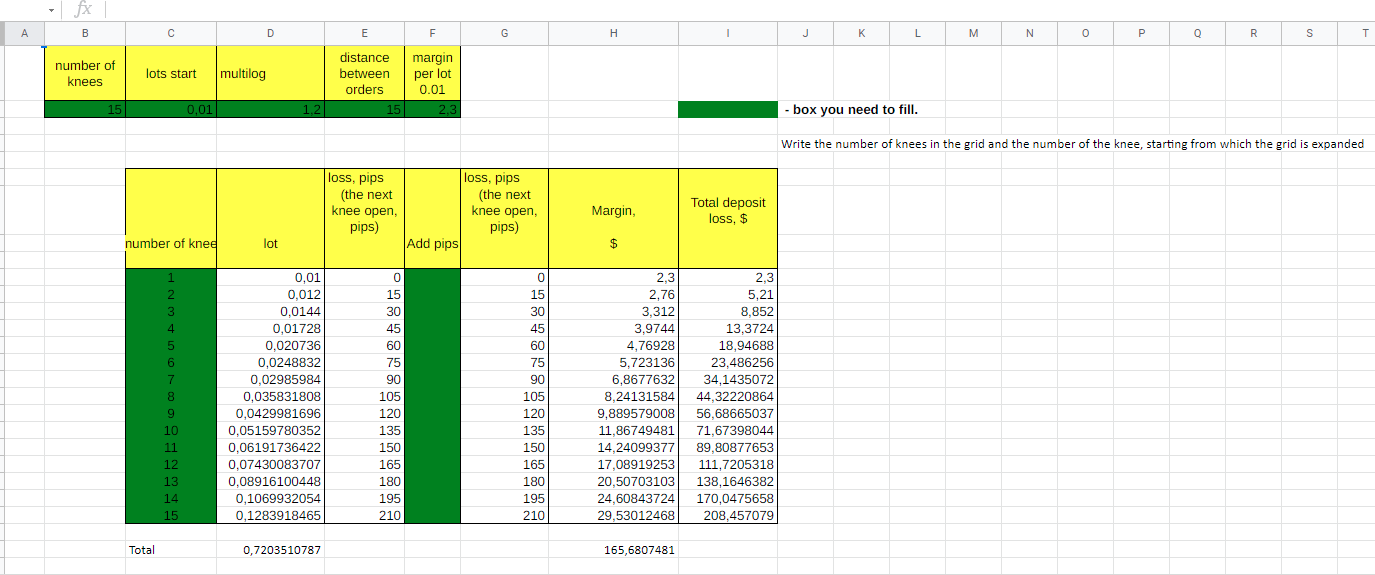
Important! To preserve your deposit, calculate the maximum allowable drawdown before you set the grid of orders. In the EA archive, you will find the Excel table (one of the possible options), where you should specify:
- The number of knees is the total number of orders in the grid.
- The starting lot volume.
- The Martingale coefficient, by which the lot size will be multiplied for each next order in the grid.
- The distance between orders is the number of points of the price movement against the trend, after which Ilan will open a new order.
- Margin is calculated according to the financial leverage.
- Add Pips is the number of the knee, starting from which the step between the orders increases (you may not specify it).
This table will demonstrate to you the amount of the potential loss that can occur with a given position volume and the number of grid orders.
Ilan 2.0
This is another modification in the Ilan family. According to the designers, this Ilan trading strategy is further developed for the M5 timeframe and the currency pairs EUR/USD, GBP/USD, USD/CHF, USD/JPY, USD/CAD. It also enters trades based on the RSI and CCI signals, trades the Martingale way with limit orders, and so on.
I haven't noticed the principal differences from the Ilan 1.6 version. The developers do not give any details, and I didn’t want to study the changes in the code. At least in the options, I don’t see any great differences between versions 1.6 and 1.7. You can download the template of this modification here.
Ilan 4.0
It seems that the popularity of the previous Ilan modifications still excites its developers. How can you make money on what has been already promoted among traders? You take the previous modification, modify it a little, and present it as a new product. This modification, based on the 1.6 version, also includes the MT4 standard indicator MFI.
It also includes extra parameters, which, in my opinion, only complicated working with the EA. Its optimization still turns into selecting the right parameters for the indicator to put the right entry. They are the Martingale coefficient and the step increment between orders. The template of this version is here.
Conclusion. For the sake of the experiment, I launched the Ilan 1.6 and Ilan 1.7 on the MT4 on the historical data of the second half of 2019 (the settings a default, they are given in the templates). I chose these two modifications as they seem the most interesting because of clear differences in the settings.
Ilan 1.6 yielded no profit by the end of the year, the Ilan 1.7 performed better results. But this doesn’t represent the effectiveness of the Ilan EA. So, study the settings, test the experts, and share your results in the comments! I wish you good luck!
P.S. Did you like my article? Share it in social networks: it will be the best "thank you" :)
Useful links:
- I recommend trying to trade with a reliable broker here. The system allows you to trade by yourself or copy successful traders from all across the globe.
- Use my promo code BLOG to get a 50% deposit bonus on the LiteFinance platform. Simply enter this code in the appropriate field when funding your trading account.
- Telegram chat for traders: https://t.me/litefinancebrokerchat. We are sharing the signals and trading experience.
- Telegram channel with high-quality analytics, Forex reviews, training articles, and other useful things for traders https://t.me/litefinance

The content of this article reflects the author’s opinion and does not necessarily reflect the official position of LiteFinance broker. The material published on this page is provided for informational purposes only and should not be considered as the provision of investment advice for the purposes of Directive 2014/65/EU.
According to copyright law, this article is considered intellectual property, which includes a prohibition on copying and distributing it without consent.