The goal of every trader is to get as much profit as possible from the price moves in a short time with an optimal level of risk. The classic risk insurance tool is a stop loss. This insurance order automatically closes the transaction if the price has turned opposite to the forecast.
To maximize profits with minimal risk of losing money rapidly, a trader has two options:
- Set a take profit and periodically move it along with the stop as the market price moves towards the predicted value.
- Use a trailing stop.
The first option allows traders to take the maximum of the trend price moves. But the trader must be at the computer all the time to constantly move buy or sell orders and close the trade in time in case of a reversal. The second option is more effective in the long term, although it forces the trader to give up part of the profit. Let's take a closer look at it.
The article covers the following subjects:
- What Are Trailing Stop Orders in Forex
- How does a trailing stop work?
- Why use trailing stop orders?
- 5 tips how to Trade with Trailing Stop Loss
- How to calculate trailing stop loss
- Trailing Stop Order Example
- Trailing Stop Expert Adviser
- Alternative to Trailing Stop order
- Trailing Stop Order vs. Stop-Loss Order: Difference
- Trailing Stop Loss vs. Trailing Stop Limit
- Trailing Stop Trading Strategies
- Trailing Stop order Advantages
- Limitations & Disadvantages of Trailing Stop order
- Conclusion
- Trailing Stop FAQ
What Are Trailing Stop Orders in Forex
A trailing stop loss is a stop order that automatically follows the price of an asset towards an open trade at a distance specified in the parameters and stops if the price reverses. It is used when a trader cannot control an open trade all the time but wants to get the most out of trend market moves.
How does a trailing stop work?
Trailing stop losses is set on the chart in the same way as a regular stop loss for an open short or long position.
The scheme of the trailing stop loss operation:
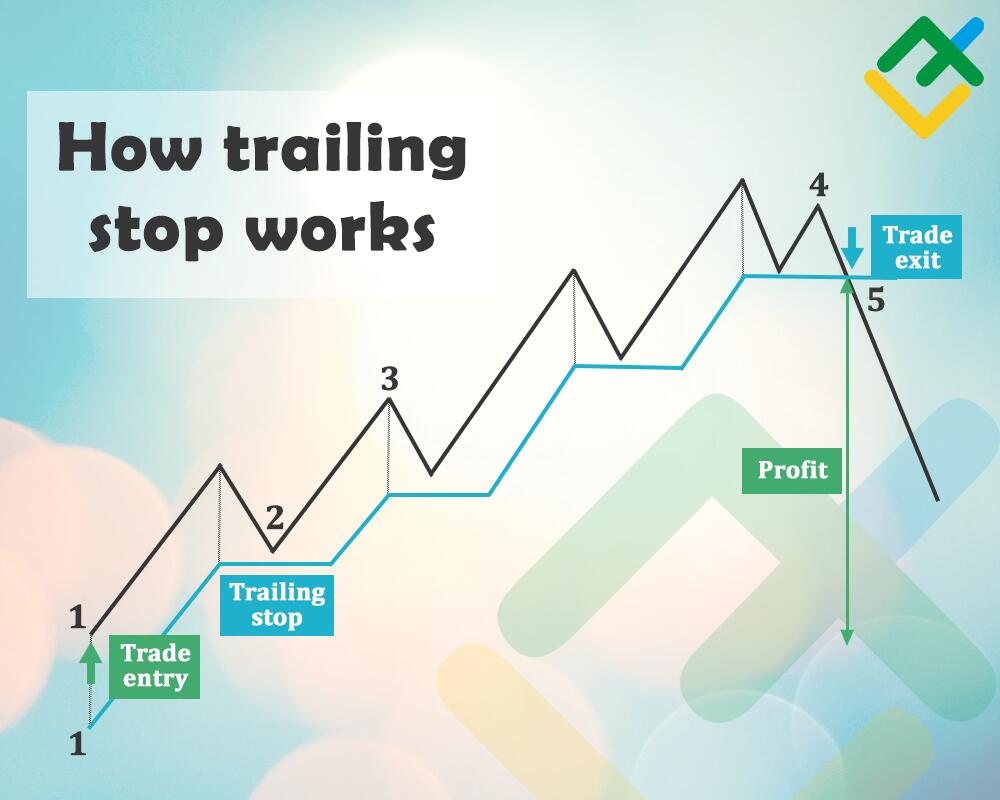
1 — The point where a long trade opens. The upward price movement is marked with a black line. A trailing stop loss price is set at a fixed distance below the price.
2 — Here, the price goes up. The trailing stop loss moves automatically behind it at a set distance. Then the local correction begins. The price drops slightly while the trailing stops stay at the same level.
3 — The price resumes the upward movement without touching the trailing stops. Otherwise, the trade is closed automatically. As soon as the distance specified in the market order parameters is set between the trailing and the price, the trailing again resumes the upward movement following the price.
4 — The uptrend ends. During the last correction, the price drops.
5 — The price touches the trailing stop. As a result, the transaction is closed automatically.
The trader's profit is the distance between the trade opening level (1) and the trailing trigger price (5).
How to set a trailing stop on MT4?
The algorithm for setting a trailing stop loss on MT4:
1. Open the chart of the security price you want to trade. Click "File/New Chart" and select an asset (stock price, bonds, CFDs, etc.). If the required asset is not in the list, it can be shown using the "Symbol" window.
For example, you want to open an ETHUSD trade. Follow these steps:
- Select "View/Symbols" in the top menu of MT4.
- In the "Crypto" section, select the desired currency pair.
- Click the "Show" button.
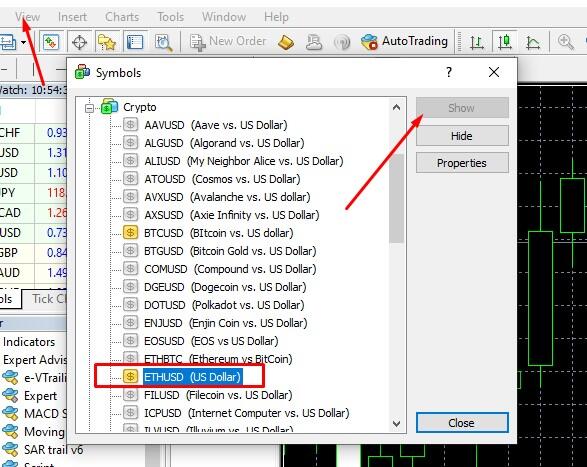
Now the required currency pair will be displayed in the list of charts available for the opening.
2. Open trade and place a market order. Click the "New Order" button on the toolbar, go to the "Tools/New Order" menu, or right-click the mouse. A trailing stop loss price can only be placed on an open position.
3. Use the right mouse button to open the menu on the transaction displayed in the "Terminal" block. In it, select "Trailing stop" and set the length in points. You can choose your own length.

If you place a trailing stop loss, it is unnecessary to set a separate stop-loss market order, but it will help in case of a connection break. The set trailing stop will be displayed on the chart as a horizontal dotted line marked with SL (stop-loss), which will move after the market price. In the “Terminal” window, a note about the triggering of trailing will appear in the S/L column.
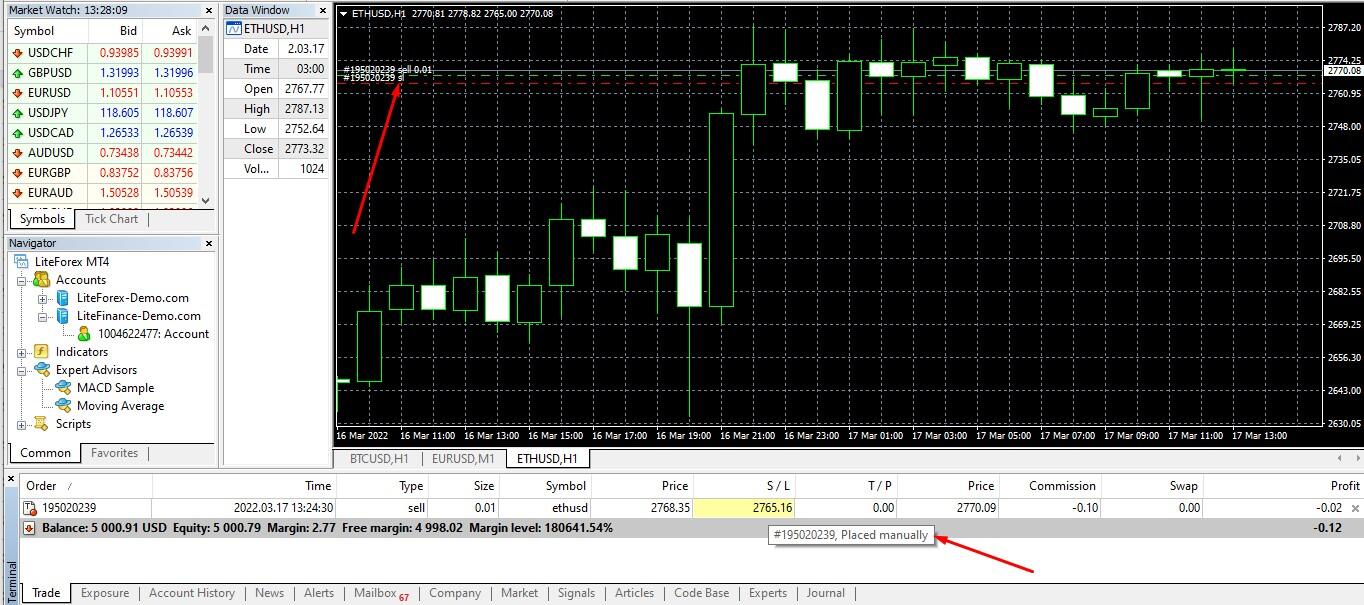
You can change the length of the trailing stop loss or remove it by opening the menu by clicking the right mouse button.
How to set a trailing stop on MT5?
The algorithm for setting trailing stops on MT5 is similar to MT4.
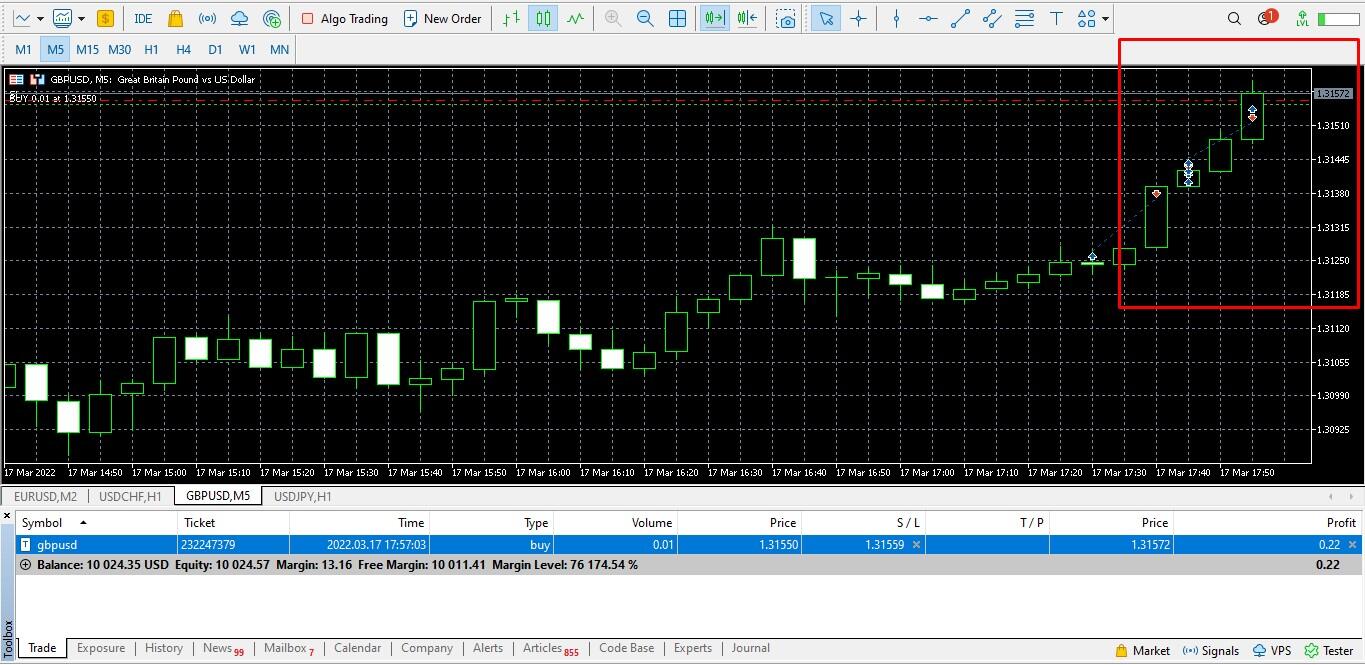
The green dotted line marks the level of opening a long trade. As soon as the price moves up by the distance in points specified in the default settings, the trailing stop loss is activated (marked with a red dotted line on the chart).
Why use trailing stop orders?
Once the trailing stop is set, you can forget about the need to control your short or long position after the market price moves to the value in points specified in the parameters and the trailing stop reaches the trigger price.
A trailing stop is required if you:
- Work with long-term strategies and log in to the platform several times a day.
- Work with several trading instruments simultaneously, and there is a risk of losing money rapidly while missing the market price reversal.
- Use trading strategies based on fundamental analysis. Markets are especially volatile at the time of breaking news releases. Trailing stops allows you to direct part of a strong short-term movement in one direction or another.
Trailing triggering is faster than manually moving a stop-loss since it is a script that automatically sends signals to the broker's server.
5 tips how to Trade with Trailing Stop Loss
How to improve the trading system using trailing stop loss orders:
- Use Price Action patterns. Your goal is to get the most out of the trend, so use a trailing stop when the previous trend ends, and a reversal pattern appears (e.g., pin bar, double top/bottom, etc.).
- Use the 50/50 rule to limit losses. Set the most conservative profit targets with the minimum possible risk when opening a trade. Upon reaching the target level, close 50% of the trade. Leave the remaining 50% in the market, specifying the trailing stop loss price at the breakeven level.
- Choose the trailing stop length according to the volatility of the security price. A long trailing stop will not move on assets with low volatility. And vice versa, when trading volatile share prices, a short trailing will close the trade ahead of schedule.
- Be tough. Do not manually increase the trailing amount if you see that the correction is still developing. Otherwise, the essence of this stop order is lost.
- Automate your trailing stops setup with Expert Advisors to simplify the calculation of its length.
Important! Trailing is triggered only once per tick (i.e., price change). If several buy or sell orders with trailing are opened for one asset (share price, Forex, etc.), then the last set is triggered first and the order is automatically sold.
How to calculate trailing stop loss
Methods for calculating the trailing stops length are almost similar to calculating the length of a static stop loss:
- According to the selected timeframe. The larger the timeframe, the more the price limit is set in points. It is different for each currency pair and depends on the depth of local corrections. Focus on averages. The trailing amount for the M30-H1 timeframes is 15-25 pips. For the H4 timeframe, it is 40-50 pips.
- Fibonacci levels. The end of the corrective price moves is most often observed at the Fibonacci retracement levels. To enter the trend at the best current market price, open a trade when the price rebounds from the correction levels. Set trailing one level lower. For example, a shallow correction ends at 0.236 and the trend continues. Set trailing at the level of 0.382.
- By local levels of resistance and support. The price may test key levels several times, after which a trend movement will begin. Set the trailing slightly above/below the levels.
Other options include calculating the trailing amount by average volatility level for the period, by moving averages, outside of market price channels.
Trailing Stop Order Example
The purpose of setting a trailing stop loss market order is to get at least some of the profit if the price does not reach the take profit. For example, you open a long trade when the price rebounds from a support level. You place Take Profit at the resistance level and set Stop price just below the support level.
Then the price can follow two possible scenarios:
- The security price reaches take profit and automatically closes with a profit.
- The price does not reach the exit price with take profit, reverses and declines. The price falls and breaks out the support level and closes on a stop loss with a loss.
The set Trailing Stop Loss will rise after the price. Even if the price does not reach the take profit, the trailing stops will be located above the opening level of the transaction. As a result, the trade will be profitable.
Trailing Stop Expert Adviser
Expert Advisors have been developed to automate the work with trailing for MT4 and MT5, as well as to simplify and speed up trading. For example, Trailing Gator Forex. The list of its advantages in comparison with the standard trailing setting includes:
- Automatic trailing setting for each transaction. There is no need to manually add a trailing after opening a market order.
- Setting trailing for pending buy or sell orders. Without an Expert Advisor, trailing can only be set after a pending order has been activated.
- Setting the trailing stop.
The adviser has few settings.
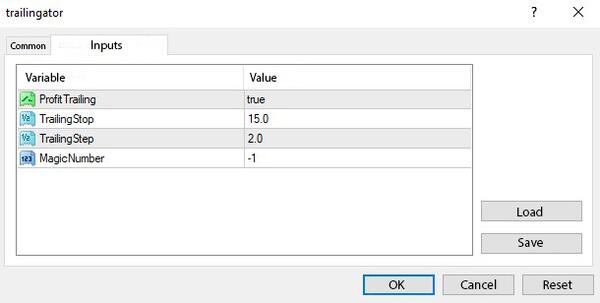
You need to specify the length of the Trailing Stop, the activation parameter for a positive order value, and the trailing activation parameter for manual/automatic trades. You can download the setup file of the Expert Advisor for MT4 here.
Alternative to Trailing Stop order
Other alternative advisors:
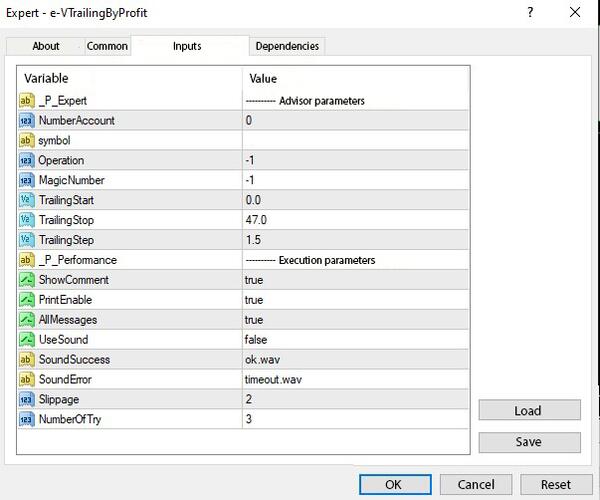
VTrailing has a large number of settings. This Expert Advisor sets trailing not for a single order, but for the total profit of all buy or sell orders. You can download it here.
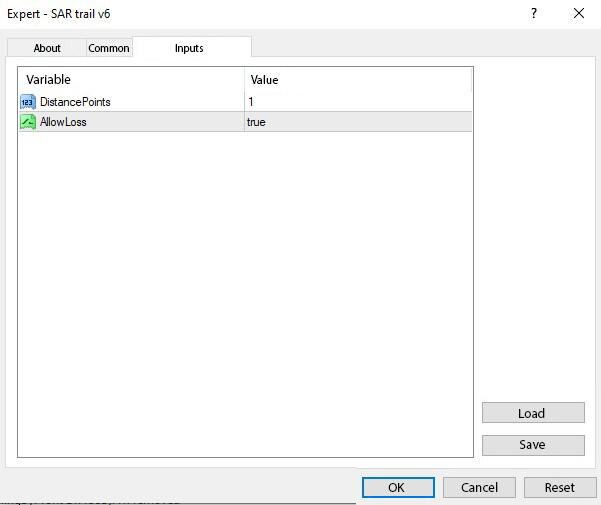
Trailing on Parabolic SAR. The calculation of this standard trailing is based on the technical indicator of the same name. There are two settings, the increment of a stop movement and the activation of trailing when the trade has not yet gone to breakeven. You can download it here.
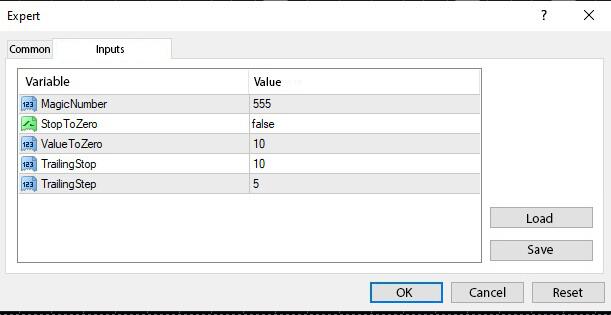
Expert. This professional adviser consists of two modules, the adviser itself and the script. Each module has its own settings. You can download it here.
The download links provided are intended for the MT4 platform. To install, save the files to the "Experts" folder by opening the "File/Open data directory".
Trailing Stop Order vs. Stop-Loss Order: Difference
Example 1. Trading with a stop loss order. The current market price of BTC is $39000. You assume that it will rise to at least $48000. However, there is a risk that the price will fall to the nearest support level of $35000. To limit losses you open a trade and set:
Take Profit — at the level of $48000.
Stop Loss — at the level of $35000.
Spread — $1000.
The price goes up, reaches $47000, reverses, and, following a downtrend, comes to the level of exit price with a stop price at $35000. Your loss, when the price falls, is $4000 + $1000 (spread) = $5000. Although with a manual closing of the trade, you could earn $47000 - $39000 - $1000 = $7000.
Example 2. Trading with trailing stop orders. The input data is the same. You open a long trade for $39000 per 1 BTC and set:
Take Profit — at the level of $48000.
Trailing Stop Loss — at the level of $35000.
Spread — 1000 USD.
The price reaches $47000 and reverses. Since the trailing length is $39000 - $35000 = $4000 and the trailing follows the price at this distance, the trailing stop loss price will be at $43000 at the time of the reversal. At this stage, the transaction will be automatically closed. The trader's profit will be $43000 - $39000 - $1000 = $3000.
Conclusion. With a manual closing of the transaction, the trader could earn $7000. Using a stop loss, traders would have made a moderate loss of $5000 and a small profit of $3000 using a trailing stop.
Trailing Stop Loss vs. Trailing Stop Limit
There are two types of orders in Forex. Market orders are opened immediately at the market price. A pending order is an order to sell or buy an asset in the future under specified market conditions. One of the types of pending orders is a limit order. In MT4, limit orders are called Buy Limit and Stop Limit. MT5 has auxiliary orders Buy Stop Limit and Sell Stop Limit. Read more about the cases in which limit orders reach trigger price in the article “Orders: Market, Limit, and Stop, Buy and Sell”.
Technically, the MT4 and MT5 platforms allow you to place a trailing stop only on an open trade. A trailing stop loss is a trailing set on a market order, while a trailing stop loss limit order is a trailing set on a pending order after its activation or using the scripts described above.
Trailing Stop Trading Strategies
The following examples of strategies describe the general principles of trailing stop. These ideas can be used to build trading systems.
Conservative trend trading
The task is to open a trade at the start of a new strong trend on the H1-H4 timeframe, which can be identified by the following signals:
- Price rebound from strong resistance/support levels with a trend line breakout.
- The appearance of reversal patterns which are confirmed by oscillators.
- Signals from trend indicators. For example, the divergence of moving averages of the Alligator indicator, average true range (ATR), etc.
Trailing is set at local extremes or slightly above/below the levels.
Example.
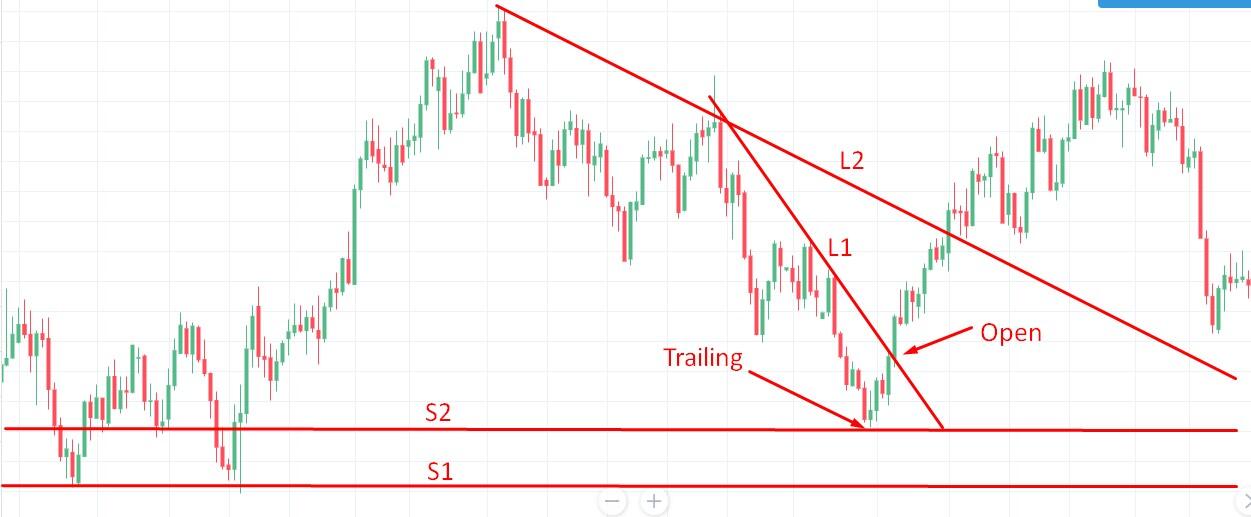
The daily chart shows that the price drops significantly, on this downtrend it is possible to draw local (L1) and long-term (L2) trend lines. It is also possible to draw the S1 support level on early extremes.
The market price does not reach the S1 level and reverses up, indicating the S2 support level. An additional preliminary signal is that the reversal was preceded by a decrease in the size of the body of candles and the appearance of the Morning Star pattern. The breakout of the L1 trend line is a signal to open a trade. Set a trailing stop at or below S2 if the market price tries to retest the support level.
Trailing stop in swing trading
Swing trading strategy concerns local trend corrections. The swing trader waits for the end of the correction, opens a trade in the direction of the main trend at the best price, and closes the trade at the start of the next correction. The end of the correction is determined by the resistance/support levels or Fibonacci levels.
Swing trading involves constant monitoring of the chart. A trailing stop loss with a length equal to the correction depth partly simplifies the trader's work.
Example
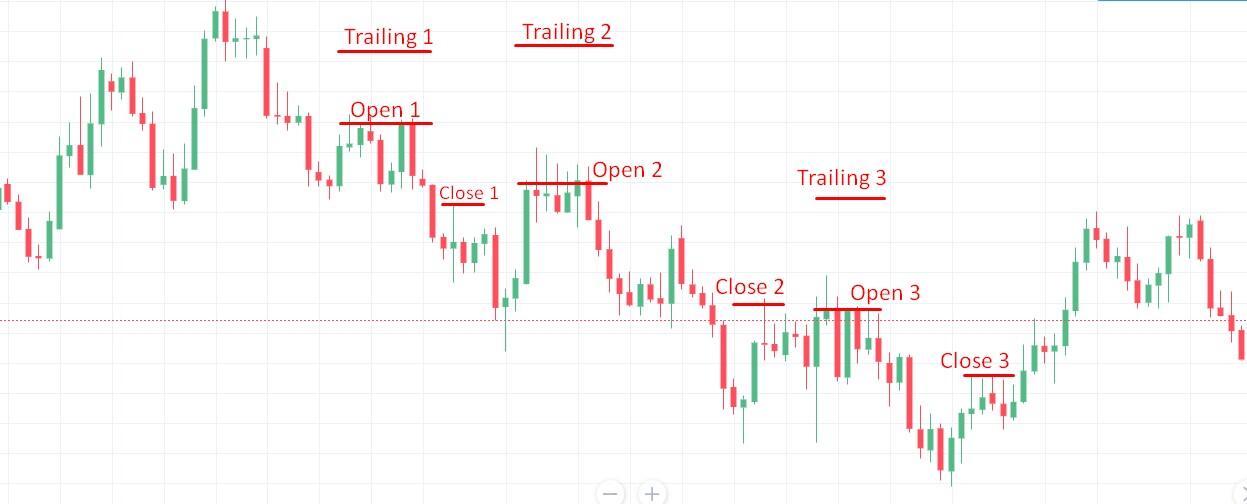
The chart shows a trend reversal and the price drops. It is characterized by long red bearish candles and short sell order green bullish ones, which confirms the formation of a strong bearish trend.
The principle of opening sell trade orders:
- Open a sell order trade at the bottom of the first correction, expressed by a local resistance level traced by two extremes. Set the trailing at a distance corresponding to the correction depth (from a small red candlestick to the Open 1 line). The trade will close automatically on the green candlestick, which corresponds to the trailing amount. Profit is the distance between Open 1 and Close 1.
- At the bottom of the next correction, give a sell order again. The correction depth is greater, so the trailing length here is almost two times longer than the previous one. The increase in depth is due to the increase in volatility and confirms that the next move down will be even more long-term. Profit is the distance between Open 2 and Close 2.
- At the end of the third correction, open the next sell trade. The length of the trailing stop loss when the sell order corresponds to the depth of the third correction. Profit is the distance between Open 3 and Close 3.
After the trade is closed by trailing at Close 3, the price continues its upward movement. As a result, the downtrend ends. Further, the chart shows the formation of the Double Top pattern, which can also be used to open a trailing trade. The strategy works on long timeframes, where the value of a pip justifies the time spent.
Trailing Stop order Advantages
Advantages of using trailing stop loss order:
- It allows traders to protect gains and take most of the profits on a directional upward/downward movement when it is not possible to follow the price chart. Trailing Stop Loss follows the price at the specified distance. If the market price rises above the set value plus the spread, you are guaranteed to make a profit even if it reverses.
- It allows you to get the maximum benefit from the trend. It is impossible to predict the end of the trend with 100% certainty. By manually closing a trade early, you risk missing out on most of your profits if the trend continues. By moving the take profit in the direction of the trend, you can miss the price reversal moment. In addition, you must constantly monitor the market price. By setting trailing, you get the maximum benefit from the trend, and in case of a losing trade risking only the amount equal to the length of the trailing.
- Automatic profit. A trailing insured trade will be closed automatically.
When setting a trailing order to sell or buy, take profit is only needed if you are sure of the potential closing level of the transaction or if you use a relatively long trailing length.
Limitations & Disadvantages of Trailing Stop order
Disadvantages of using Trailing Stops:
- The risk of losing trade due to a correction on a strong trend movement. If the correction depth is greater than the trailing amount, the trade will close automatically while the price continues the main movement.
- Setting method. Take profit and stop loss are set on the server while trailing stop loss orders in the client platform. If the connection between the platform and the server is lost, the trailing operation stops. A solution to the problem is to rent a VPS server with a client platform. If the connection with the trader's computer is lost, the connection between the MT4/MT5 on the VPS server and the broker's server will remain and the trailing will work.
Trailing stops are often used in trending markets with a timeframe from M30-H1 and above. Trading with trailing inside the channel makes sense only on timeframes from H1-H4. In scalping and sideways price movement, trailing is ineffective.
Conclusion
Key takeaways about the trailing stop orders:
- Protects against loss if the price reverses.
- Moves after the price following the specified length. It is activated only when the market price has passed the specified distance in points since the opening of the trade.
- It is set only for an open trade. It is set on pending orders only after they reach trigger price.
- It does not work if you turn off the computer or disconnect it from the Internet. The solution is to use a VPS server.
- It is used in trend strategies during the highest price volatility. It is not used in scalping and on short intervals M5-M15.
In practice, there may be questions about how to apply trailing stops. For example, are points calculated in old or new quotes? Is a trailing set relative to Bid or Ask? Therefore, I recommend perfecting the work with a trailing stop on demo retail investor accounts. You can find information about how an order works in MT4. To do this, click the tab "Journal" in the "Terminal" window.
Trailing Stop FAQ
A trailing stop is a stop order that is used to limit losses. It is set on an open order at a fixed distance and follows the market price according to the forecast. If the price moves in the opposite direction, the trailing stop loss remains in place. As soon as the price touches the trailing stop level during the reversal, the trade automatically closes.
A trailing stop loss is a trailing set on a market order used by traders in their retail investor accounts. A trailing stop loss order is used to minimize the loss in case of a price reversal in the other direction to the forecast. This tool is most often used when there is a strong trending price movement, and when it is not possible to monitor the chart constantly. Unlike a regular stop, a trailing stop loss allows traders to get at least part of the profit when the trade is automatically closed.
- Open a trade on the chart of the corresponding asset.
- In the "Terminal" window, right-click on the desired trade and select the option to set trailing. Choose from the suggested levels or set your own. You can remove trailing by right-clicking the menu and checking the box next to "No".
The length of the trailing stop loss order depends on several parameters, so there is no answer about its optimal length. Trading theory recommends that novice traders adhere to the classic rule of 1:2 or 1:3 ratio between stop loss and take profit. Over time, you will figure out what ratio is optimal and how to calculaty the length of the trailing.
The trailing stop loss keeps the specified distance between the current market price and the stop loss level if the price moves in the predicted direction, and stops if the price reverses.
For example, the current market price of oil futures is 98 USD. You assume that the price will go up, but just in case, you set a 5 USD trailing stop loss at 93 USD. You set a regular stop loss at the same level.
- If the price reverses before the trailing activation (+5 pips from the open point) and goes down, the trade will be closed at the usual stop at 93 USD.
- If the price goes up, a trailing will follow it after activation. For example, the price rises by 7 USD and reverses; the trade is closed by trailing at 93+7 = 100 USD with a profit of 2 USD. If the price rose by 7 USD, rolled back by 4 USD, and started to grow again, the trailing will not trigger and will resume movement again as soon as the difference between it and the price becomes 5 USD.
A trailing stop loss is most often used on a trend movement when the goal is to get the most out of it, but there is no opportunity to monitor the chart constantly. Here are a few tips for setting a trailing stop:
- The higher the volatility and the deeper the trend correction, the longer the trailing.
- The trailing is set when a confident long-term trend movement has begun.
- It is recommended to additionally set a static stop loss at the breakeven level. If you are not using a VPS and there is a risk of a connection break.
This is a setting of trailing for open trade to protect gains and take most of the profits on a trend movement or take most of the price movement during the level of highest price volatility.
There is no universal principle for determining the trailing stop loss order length. Its value may depend on market volatility, timeframe, level of risk provided by your trading system, etc.
Ways to determine the trailing stop loss length in order to limit losses:
- Beyond local price extremes. Slightly above/below current resistance/support levels or trend lines.
- Outside the price channel.
- According to the average volatility values. The average volatility for the period can be found in calculators on analytical portals. You can also use the ATR indicator.
- According to Fibonacci retracement levels. Set trailing just above/below key retracement levels.
On the asset chart (for example, stock price chart), the trailing stop loss order is displayed in the same way as the stop loss:
- After the order is activated on the chart in MT4/MT5, the trailing line appears as a horizontal red dotted line marked SL.
- Unlike the static SL, the dotted line follows the price.

The content of this article reflects the author’s opinion and does not necessarily reflect the official position of LiteFinance broker. The material published on this page is provided for informational purposes only and should not be considered as the provision of investment advice for the purposes of Directive 2014/65/EU.
According to copyright law, this article is considered intellectual property, which includes a prohibition on copying and distributing it without consent.